第 1 章:Agent 到底是怎么工作的
第 1 章:Agent 到底是怎么工作的
关于本课
这门课的视频是某个时间点的快照。Strands 一直在活跃开发,所以本页的代码反映的是最新的写法,但视频里讲的概念依然成立。拿不准的时候,以代码为准。
为什么需要 Agent?
Model 是无状态的。它处理一个请求,给出一次补全,然后就忘了。它没法自己采取行动、拿不到实时数据,也协调不了多步流程。Agent 解决这个问题的办法,是把 Model 包进一个运行时系统里,给它工具、记忆和一个推理循环。
Agent Loop
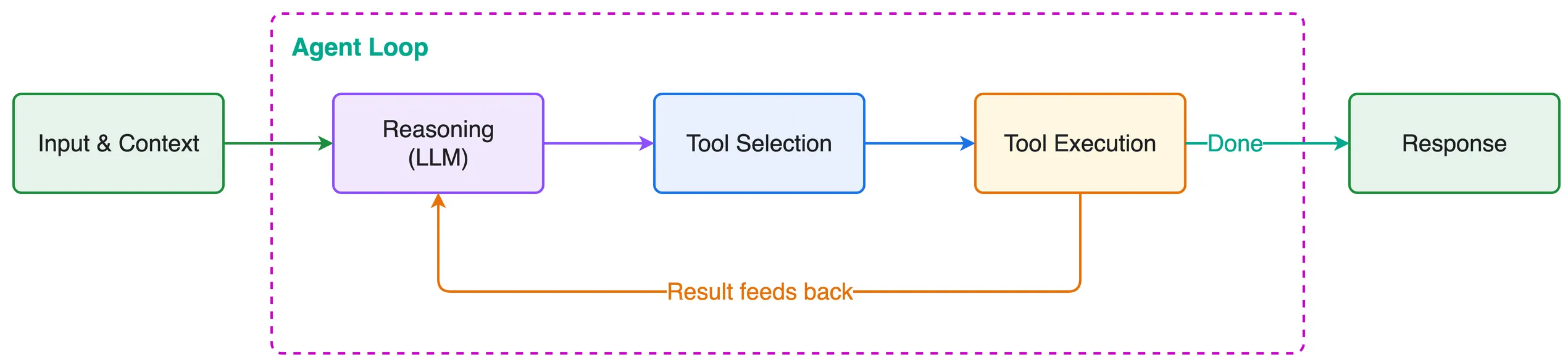
- Model 收到上下文(system prompt + 用户输入 + 工具列表 + 历史记录)
- Model 进行推理,判断要不要调用工具
- 工具执行,结果回流进上下文
- 循环重复,直到任务完成
Agent = Model + Harness
Harness 是包在 Model 外面、把它变成 Agent 的那套系统。它负责 Agent Loop、工具执行、上下文管理、记忆、生命周期控制、可观测性和验证。
合起来就是:Model + Harness = Agent。
三层工程
Prompt Engineering: 发给 Model 的指令和约束
Context Engineering: 哪些信息进入上下文窗口、什么时候进、怎么进
Harness Engineering: 把这一切编排起来的运行时系统
Strands Harness SDK
Strands Harness SDK 是一个用来构建 Agent Harness 的开源 SDK。它提供了一组可组合的 primitive,比如 Tool、上下文管理、生命周期 Hook、Memory、Session、评测和可观测性,你按自己的场景把它们组装成需要的系统。
设计哲学: 让 Model 来驱动。你定义环境和边界,Model 自己推理着把任务做完。
代码:一个简单的 Agent
这已经是一个能跑的 Agent 了,带循环,只是没有工具。
from strands import Agent

agent = Agent()

response = agent("What are the key differences between REST and GraphQL APIs?")
print(response)代码:带工具的 Agent
web_fetch 这个 vended tool 会引入一个 HTML 解析器,所以要带上对应的 extra 来装 SDK:pip install 'strands-agents[web-fetch]'。
from strands import Agent, tool
from strands.vended_tools import file_editor, web_fetch

@tool
def query_product_database(query: str) -> str:
    """Query the internal product database for inventory and pricing information.

    Args:
        query: Search query for products (e.g., "wireless headphones", "USB-C hub")
    """
    products = {
        "wireless headphones": "SKU-WH100: Wireless Headphones Pro - $79.99, 142 in stock, 4.5★ rating, launched 2025-03",
        "usb-c hub": "SKU-UC200: USB-C Hub 7-in-1 - $45.00, 89 in stock, 4.2★ rating, launched 2024-11",
        "mechanical keyboard": "SKU-MK300: Mechanical Keyboard RGB - $149.99, 23 in stock, 4.8★ rating, launched 2025-01",
        "noise cancelling": "SKU-NC400: Noise Cancelling Earbuds - $129.99, 67 in stock, 4.6★ rating, launched 2025-05",
    }
    key = query.lower()
    matches = [info for product_key, info in products.items() if product_key in key]
    if matches:
        return "\n".join(matches)
    return f"No products found matching '{query}'. Available: wireless headphones, usb-c hub, mechanical keyboard, noise cancelling"

SYSTEM_PROMPT = """You are a product research analyst. You help the team understand
market positioning by comparing competitor pricing with our internal catalog.

When given a research task:
1. Use web_fetch to gather public market data from the web
2. Use query_product_database to check our internal pricing and inventory
3. Write a brief competitive analysis and save it to report.md using file_editor"""

agent = Agent(
    tools=[web_fetch, file_editor, query_product_database],
    system_prompt=SYSTEM_PROMPT,
)

result = agent("Research what wireless headphones are trending on the market and compare it against our offerings. "
               "Write a short competitive positioning summary and save it to report.md")
几个关键概念:
@tool装饰器把任何 Python 函数变成 Agent 可以调用的 Tool- Docstring 会成为 Model 看到的 Tool 描述
- 类型标注自动生成输入 schema
- System prompt 定义 Agent 的身份和行为
跑完之后,agent.messages 会显示循环走过的每一步:用户回合、assistant 文本、Tool Calling 和工具返回结果。想知道 Agent 为什么这么干,这里是第一个该看的地方。
开箱即用的组件
Strands 还附带了一些预配置组件,让你开箱就有一个能力不错的 Agent:
- Vended tool,覆盖文件操作、shell 访问和网页抓取
- 自动上下文管理,会把大的结果卸出去、压缩旧消息,并在窗口填满前主动触发压缩
- Plugin 系统,用来扩展行为
你可以从这些默认配置起步再往上改,也可以用那些 primitive 从零搭。
from strands import Agent
from strands.models import BedrockModel
from strands.vended_tools import file_editor, shell
from strands.vended_tools.web_fetch import web_fetch

agent = Agent(
    model=BedrockModel(
        model_id="us.anthropic.claude-sonnet-5",
    ),
    # Vended tools for file ops, shell, and web fetching
    tools=[file_editor, shell, web_fetch],
    # Auto context management: offloads large tool results, compresses old
    # messages into summaries, and fires proactive compression at 85% usage.
    context_manager="auto",
)

# Give it a research task
agent("Research the current state of AI agent deployment patterns in production, including common architectures, challenges teams face, and best practices. Write a summary to report.md")