第 2 章 架构与模式:规划、反应式与多智能体系统(Architectures and Patterns: Planning, Reactivity, and Multi-Agent-Systems)
思维链(CoT)
关于本 notebook
本 notebook 是一个数据分析 Agent 的动手模板,它将 LangChain/LangGraph 的 tool-calling(ReAct)Agent 与一个精简的 LangGraph 封装组合在一起。它展示了如何从 CoT 风格的 prompt 驱动一个沙箱化的 Python REPL tool 来加载 CSV、计算统计量并生成简单图表,同时返回最终答案、恢复出的图表以及中间 tool 步骤。
它展示了什么
通过
.env/环境变量进行 API 配置(OPENAI_API_KEY),或者在无法获取时以交互方式输入作为 fallback。一个沙箱化的 Python REPL tool(
PyodideSandboxTool),它在隔离的 Pyodide/WASM 环境中运行模型的代码,将结果打印到 stdout,并将错误以 traceback 形式呈现。CoT 风格的系统指令,以推理结构(描述 → 模式 → 总结)开头,并将沙箱/执行机制放在单独的模块中。
一个 tool-calling ReAct Agent,使用
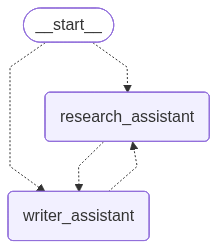
create_react_agent创建(LangGraph 预构建;在 LangChain v1 中这是create_agent)。一个精简的 LangGraph,只包含一个运行该 Agent 的节点,并暴露
messages历史output(最终答案)chart_path/chart_svg(恢复出的图表)intermediate_steps(tool 调用与观测结果)。
一个临时创建的演示 CSV,保证运行可复现。
单节点图的 Mermaid 图渲染。
你将运行什么
从
.env/环境变量加载OPENAI_API_KEY,或以交互方式输入。定义一个沙箱化的 Python REPL tool。由于沙箱文件系统对宿主机不可见,prompt 会让它把图表以 base64 编码的 SVG 形式通过 stdout 输出,而不是保存文件。
构建一个 tool-calling(ReAct)Agent,其 prompt 会
- 描述数据集
- 突出模式
- 以简短总结收尾
- 当存在目标列时,调用 REPL 计算指标并绘制一个条形图。
将 Agent 封装进一个单节点 LangGraph,并用一条提供 CSV 数据和目标列的用户消息来调用它。
检查最终 Agent 输出与中间 tool 步骤,以实现透明可追溯。
查看恢复出的条形图,它会在单元格中以 SVG 形式内联渲染。
可选地查看图的 PNG/Mermaid 渲染。
工作原理
- REPL tool 在隔离的 Pyodide/WASM 沙箱中运行模型的 Python 代码,并返回捕获到的 stdout(出错时返回 traceback)。该沙箱拥有自己的一次性文件系统,因此用
open(...)写入的任何内容对 notebook 都是不可见的——这也是图表必须以打印在两个标记行之间的 base64 编码 SVG 形式传回、再由宿主机解码的原因。 - Agent 根据系统指令和聊天历史决定何时调用 tool、调用什么样的代码。
- 图节点调用 Agent,捕获
output与intermediate_steps,从 tool 输出中恢复 SVG 图表,并将所有内容写回 state,以便你可以继续串联后续步骤。 - 宿主机随后通过
IPython.display内联渲染 SVG(并同时保存到磁盘)。
为什么用这个模式
- Tool-calling Agent 非常适合结构化 tool 使用:模型输出的是结构化的 tool-call 参数,而不是自由形式的文本。
- LangGraph 提供了一个轻量的 state 封装,让你可以轻松地将它织入更大的工作流。
- 沙箱化的 REPL 让分析可验证——每个统计量和图表都是由你读得懂的代码生成的——同时让执行与你的机器保持隔离。
扩展与适配
- 为文件上传、SQL 或网页抓取添加 tool。
- 在系统提示词中强制使用更严格的模板,以生成一致的报告。
- 在生产环境中把 Pyodide 沙箱替换为容器化/远程沙箱。
- 在返回最终答案前添加用于校验或报告格式化的节点。
要求与注意事项
- 你需要一个有效的
OPENAI_API_KEY。 - REPL 已经在一个隔离的 Pyodide 沙箱中运行代码;在生产环境中,请考虑使用带资源限制的加固/容器化沙箱。
- 沙箱内没有 matplotlib、也不保存图片:图表是手工构建的 SVG 字符串,通过 stdout 输出并在宿主机侧恢复。内联渲染使用
IPython.display,因此图表会在你于 notebook 中运行单元格时显示(而不会在通过!python script.py运行文件时显示)。 create_react_agent在 LangGraph v1 中已弃用,应改用from langchain.agents import create_agent;当前代码仍使用前者(它只会产生一条警告)。
依赖
由于存在冲突,先卸载一些依赖
!pip uninstall -y langchain_sandbox langchain-sandbox langchain-core langchain langchain-openai langgraph langgraph-prebuilt langgraph-checkpoint!pip install -q \
langchain-sandbox==0.0.6 \
langchain-core==0.3.86 \
langgraph==1.0.1 \
langchain-openai==0.3.35 \
langchain \
python-dotenv==1.0.1!curl -fsSL https://deno.land/install.sh | sh
import os
os.environ["PATH"] += ":/root/.deno/bin"API 配置
# --- API Key Setup ---
# Option 1 (preferred): create a `.env` file in your project folder with:
# OPENAI_API_KEY=your_openai_key_here
#
# Option 2: set it directly in the notebook with magic:
# %env OPENAI_API_KEY=your_openai_key_here


from dotenv import load_dotenv
import os

load_dotenv()
OPENAI_API_KEY = os.getenv("OPENAI_API_KEY")

if not OPENAI_API_KEY:
    print("⚠️ OPENAI_API_KEY not found. You can set it with `%env` in the notebook or enter it below.")
    OPENAI_API_KEY = input("Enter your OPENAI_API_KEY: ").strip()

print("✅ API key loaded successfully!")
✅ API key loaded successfully!导入
from typing import TypedDict, List, Any, Dict, Optional
from pathlib import Path
import base64
import re

import pandas as pd
from langchain_openai import ChatOpenAI
from langchain_sandbox import PyodideSandboxTool
from langgraph.prebuilt import create_react_agent
from langchain_core.messages import SystemMessage, HumanMessage, AIMessage, BaseMessage
from langgraph.graph import StateGraph, START, END
/usr/local/lib/python3.12/dist-packages/langgraph/checkpoint/base/__init__.py:17: LangChainPendingDeprecationWarning: The default value of `allowed_objects` will change in a future version. Pass an explicit value (e.g., allowed_objects='messages' or allowed_objects='core') to suppress this warning.
from langgraph.checkpoint.serde.jsonplus import JsonPlusSerializer在宿主机侧恢复图表
# Markers used to get the chart out of the sandbox via stdout, plus the host path.
SVG_BEGIN = "===SVG_B64_BEGIN==="
SVG_END = "===SVG_B64_END==="
CHART_PATH = Path("mean_values_by_city.svg")

def extract_svg_from_messages(
    messages: List[BaseMessage], out_path: Path
) -> Optional[Path]:
    """Find the base64-encoded SVG the sandbox printed to stdout and write it to a
    real file on the host. Returns the path if found, else None."""
    pattern = re.compile(
        re.escape(SVG_BEGIN) + r"(.*?)" + re.escape(SVG_END), re.DOTALL
    )
    for msg in messages:
        content = getattr(msg, "content", "")
        if isinstance(content, list):  # some message contents are lists of blocks
            content = " ".join(str(part) for part in content)
        if not isinstance(content, str):
            continue
        match = pattern.search(content)
        if not match:
            continue
        blob = re.sub(r"\s+", "", match.group(1))  # drop any stray whitespace/newlines
        try:
            svg = base64.b64decode(blob).decode("utf-8")
        except Exception:
            continue
        out_path.write_text(svg, encoding="utf-8")
        return svg  # changed: return the markup so the host can also render it inline
    return None

def show_chart(svg: Optional[str], path: Optional[str]) -> None:
    """Render the chart inline in a Jupyter/Colab cell. Falls back to a plain
    message (and optional PNG export) when not running inside IPython."""
    if not svg:
        print("[warning] No chart was recovered from the sandbox stdout.")
        return
    try:
        # In a notebook this draws the chart directly in the cell output.
        from IPython.display import SVG, display

        display(SVG(svg))
        if path:
            print(f"(also saved to {path})")
        return
    except Exception:
        pass  # not in a notebook / IPython unavailable

    # Non-notebook fallback: report the file and optionally export a PNG.
    if path:
        print(f"SVG chart written to: {path} (open in a browser to view)")
        try:
            import cairosvg  # optional: pip install cairosvg

            png_path = Path(path).with_suffix(".png")
            cairosvg.svg2png(url=path, write_to=str(png_path))
            print(f"PNG chart written to: {png_path.resolve()}")
        except Exception as exc:
            print(f"(PNG export skipped: {exc})")
工具:Python REPL
python_repl = PyodideSandboxTool(
    name="python_repl",
    description=(
        "Execute Python code for data analysis. Always print results. Use pandas for "
        "tables. Charts must be emitted as pure SVG strings printed to stdout "
        "(matplotlib is not available, and the sandbox filesystem is not visible to "
        "the host)."
    ),
    allow_net=True,
)
tools = [python_repl]
CoT 风格系统提示词
SYSTEM_INSTRUCTIONS = f"""You are a careful data analysis assistant. Think step by step and be explicit in your reasoning.

Structure your analysis as a clear chain of thought, and present your FINAL ANSWER in these three parts:
1. Describe the dataset: its shape, its columns, and what each column represents.
2. Highlight the patterns or trends you find.
3. Conclude with a clear summary of insights.

--- How to run the analysis ---
To compute metrics or build a chart, call the python_repl tool with code that:
- Loads the CSV data from the user message using io.StringIO
- Prints descriptive statistics
- If a target column exists, computes the mean numeric values grouped by the target
- Builds one grouped bar chart (target categories on the x-axis, numeric means as the bars)
- Prints the key results

--- Returning the chart to the host (required) ---
The sandbox filesystem is NOT visible to the host, so writing the chart with open(...) would lose it.
Instead, assemble the chart as a pure SVG document in a Python string named svg_str, then emit it
base64-encoded between two marker lines:
    import base64
    print("{SVG_BEGIN}")
    print(base64.b64encode(svg_str.encode("utf-8")).decode("ascii"))
    print("{SVG_END}")

--- Sandbox constraints ---
- Do not import matplotlib or matplotlib.pyplot, and do not use plt.show(); charts must be hand-built SVG strings.
- Do not use backslash escape sequences inside Python string literals (no '\\nText' or 'a\\nb').
  For blank lines use print() on its own line; to join multi-line text or SVG fragments use chr(10).join([...]) or "".join([...]).

Return your FINAL ANSWER only after you have executed the analysis successfully."""
LangGraph state 与节点
class AgentState(TypedDict):
    messages: List[BaseMessage]
    output: str
    chart_path: Optional[str]
    chart_svg: Optional[str]
    intermediate_steps: Any


llm = ChatOpenAI(model="gpt-5.4-mini", temperature=0)

agent = create_react_agent(
    model=llm,
    tools=tools,
    prompt=SYSTEM_INSTRUCTIONS,
)


def agent_node(state: AgentState) -> Dict[str, Any]:
    result = agent.invoke({"messages": state["messages"]})
    messages = result.get("messages", [])

    output = ""
    if messages:
        output = getattr(messages[-1], "content", "") or ""
    svg = extract_svg_from_messages(messages, CHART_PATH)

    return {
        "messages": messages,
        "output": output,
        "chart_path": str(CHART_PATH.resolve()) if svg else None,
        "chart_svg": svg,
        "intermediate_steps": result,
    }
/tmp/ipykernel_2534/3182925875.py:11: LangGraphDeprecatedSinceV10: create_react_agent has been moved to `langchain.agents`. Please update your import to `from langchain.agents import create_agent`. Deprecated in LangGraph V1.0 to be removed in V2.0.
agent = create_react_agent(构建一个单节点微型图
builder = StateGraph(AgentState)
builder.add_node("agent", agent_node)
builder.add_edge(START, "agent")
builder.add_edge("agent", END)
app = builder.compile()
演示数据集与运行
demo_csv = Path("demo.csv")
if not demo_csv.exists():
    df = pd.DataFrame(
        {
            "city": ["A", "A", "B", "B", "C"],
            "sales": [10, 12, 8, 9, 15],
            "cost": [3, 4, 2, 2, 5],
        }
    )
    df.to_csv(demo_csv, index=False)

target = "city"
csv_text = demo_csv.read_text()

human = HumanMessage(
    content=(
        f"Target column: {target}\n\n"
        "CSV data:\n"
        f"{csv_text}"
    )
)

initial_state: AgentState = {
    "messages": [human],
    "output": "",
    "chart_path": None,
    "chart_svg": None,
    "intermediate_steps": [],
}

final = app.invoke(initial_state)

print("\n=== Agent output ===\n")
print(final.get("output", ""))
=== Agent output ===
1. Describe the dataset
- Shape: 5 rows × 3 columns
- Columns:
- `city`: target/category column with values A, B, and C
- `sales`: numeric measure of sales
- `cost`: numeric measure of cost
2. Highlight patterns or trends
- There are 3 unique cities in the data.
- Average values by city:
- A: sales 11.0, cost 3.5
- B: sales 8.5, cost 2.0
- C: sales 15.0, cost 5.0
- City C has the highest average sales and cost.
- City B has the lowest average sales and the lowest average cost.
- City A sits between B and C for both metrics.
- Overall, sales and cost appear to move together across cities: the city with higher sales also tends to have higher cost.
3. Conclude with a clear summary of insights
- The dataset is small but shows a clear ordering across cities: B lowest, A middle, C highest for both sales and cost.
- This suggests a positive relationship between sales and cost in this sample.
- If you want, I can also help interpret whether the higher cost in C seems efficient relative to its sales.展示最终回到宿主机侧的图表
在 notebook 中会内联渲染;否则会报告已保存的文件。
print("\n=== Chart ===\n")
show_chart(final.get("chart_svg"), final.get("chart_path"))

print("\n=== Raw result / intermediate info ===\n")
print(final.get("intermediate_steps", ""))
=== Chart ===(also saved to /content/mean_values_by_city.svg)
=== Raw result / intermediate info ===
{'messages': [HumanMessage(content='Target column: city\n\nCSV data:\ncity,sales,cost\nA,10,3\nA,12,4\nB,8,2\nB,9,2\nC,15,5\n', additional_kwargs={}, response_metadata={}, id='10fffb32-3266-4495-ab75-8154e4d4eccd'), AIMessage(content='', additional_kwargs={'tool_calls': [{'id': 'call_irLNTIXBSyt0CmhvR8dNHfQf', 'function': {'arguments': '{"code":"import pandas as pd\\nfrom io import StringIO\\nimport base64\\n\\ncsv_data = \'\'\'city,sales,cost\\nA,10,3\\nA,12,4\\nB,8,2\\nB,9,2\\nC,15,5\'\'\'\\n\\ndf = pd.read_csv(StringIO(csv_data))\\nprint(\'DataFrame shape:\', df.shape)\\nprint(\'Columns:\', list(df.columns))\\nprint()\\nprint(\'Descriptive statistics:\')\\nprint(df.describe(include=\'all\'))\\nprint()\\n\\n# Group means by target if target exists\\nif \'city\' in df.columns:\\n grouped = df.groupby(\'city\').mean(numeric_only=True)\\n print(\'Grouped mean numeric values by city:\')\\n print(grouped)\\n print()\\n\\n # Build grouped bar chart as SVG\\n categories = grouped.index.tolist()\\n numeric_cols = grouped.columns.tolist()\\n width, height = 700, 420\\n margin_left, margin_right, margin_top, margin_bottom = 70, 30, 40, 70\\n plot_w = width - margin_left - margin_right\\n plot_h = height - margin_top - margin_bottom\\n max_val = float(grouped.to_numpy().max())\\n y_max = max_val * 1.2 if max_val > 0 else 1\\n n_cat = len(categories)\\n n_series = len(numeric_cols)\\n group_w = plot_w / n_cat\\n bar_w = group_w / (n_series + 1)\\n colors = [\'#4e79a7\', \'#f28e2b\', \'#59a14f\', \'#e15759\', \'#76b7b2\']\\n parts = []\\n parts.append(f\'\')\\n svg_str = \'\'.join(parts)\\nfrom IPython.display import Image, display
display(Image(app.get_graph().draw_mermaid_png()))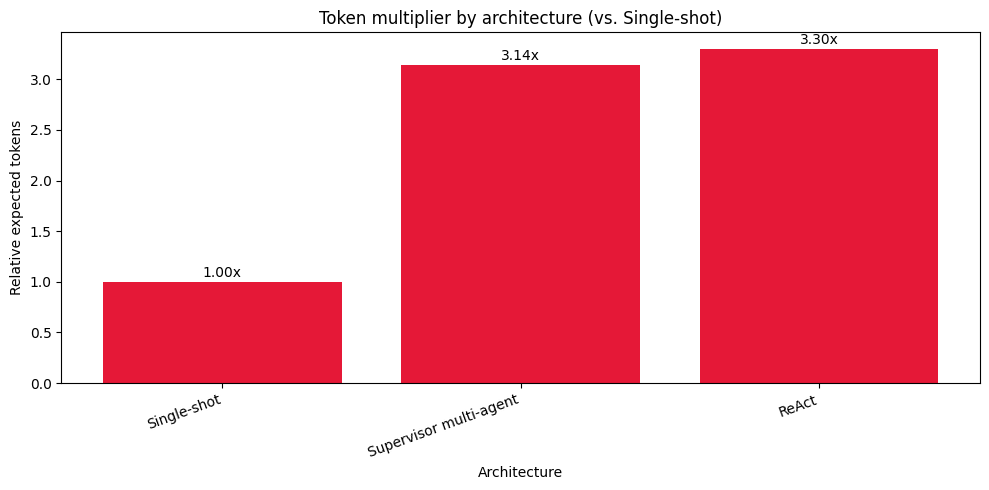
人在回路(HITL)
关于本 notebook
本 notebook 是一份 LangGraph 人在回路(HITL)模式的动手指南。它展示了如何为 Agent 工作流添加精确的人工控制,从轻量级的审批门控到完整的交互式编辑,同时保持代码简洁且面向生产。
你将学到什么
- 如何连接 LangGraph 的 interrupt 来暂停运行、收集人工输入,并以确定性的方式恢复。
- 如何使用
InMemorySaver保存 checkpoint,使运行可以在不丢失上下文的情况下停止和继续。 - 如何包装 tool,让人在调用执行之前可以接受、编辑或覆盖该调用。
- 如何驱动尊重人工对 tool 调用审查的简单 ReAct 风格循环。
- 如何实现并行 interrupt 并用单个映射(map)恢复它们。
模型与配置
本 notebook 在启动时设置一个 provider 开关。
LLM_PROVIDER=openai通过langchain_openai使用 OpenAI。LLM_PROVIDER=openrouter通过ChatOpenAI和自定义base_url使用 OpenRouter。
环境变量通过 python-dotenv 从 .env 加载:
LLM_PROVIDER(openai或openrouter)OPENAI_API_KEY,当 provider 为 OpenAI 时OPENROUTER_API_KEY,当 provider 为 OpenRouter 时- 可选的模型覆盖:
OPENAI_MODEL(默认gpt-5.4-nano)OPENROUTER_MODEL(默认openai/gpt-5.4-nano)
展示的模式
模式 A —— 内容生成上的人工反馈循环
一个用于 LinkedIn 帖子的简单写作-评审循环。模型起草内容。人工通过 interrupt 提供迭代反馈。图会一直循环,直到人工输入 done。适用于任何受益于迭代打磨的短文本内容工作流。
模式 B —— 敏感调用前的人机协作(HITL)checkpoint 模型将 HTTP 请求以 JSON 形式提出。在代码执行外部调用之前,人工可以选择批准、修改、请求更多上下文或拒绝。这是网络或金融等关键操作的极简但强大的安全互锁。
模式 C —— 评审并编辑 state 模型写一段简短总结。人工就地编辑文本。编辑后的文本成为新的 state。该模式非常适合合规性或品牌语气检查。
模式 D —— 带单个 resume map 的并行 interrupt 两个独立的 interrupt 同时触发。运行器打印两个 payload,并为每个 interrupt 收集一个 resume 值,然后一次性恢复图。这是多条目评审任务的模板。
模式 E —— 小型 ReAct 循环中的 tool 调用评审
一个 tool 用 add_hitl 包装。在真正执行之前,人工可以选择接受、编辑参数,或用 stub 结果响应。循环持续进行,直到模型不再请求 tool。这是受监督 tool 使用的最小示例。
模式 F —— 用于调试的静态 interrupt 在特定节点前后注册图级别的 interrupt,以创建确定性的断点。这对逐步调试和单元式测试很有用。
交互式运行器的工作原理
每个 demo 都会构建一个编译后的图,并启动一个新的 thread id 以获得干净的 state。
当 interrupt 发生时,终端会打印 payload 并等待输入。
你可以粘贴原始字符串或 JSON。对于模式 E 中的 tool 包装器,你可以提供:
{"type": "accept"}{"type": "edit", "args": {"args": {"query": "weather in Zurich"}}}{"type": "response", "args": "Skip for now"}
对于并行 interrupt,运行器会打印一个带编号的列表,并为每个 interrupt id 收集 resume 值,然后通过一次 Command(resume=...) 恢复。
依赖
langgraph,用于图、interrupt、checkpoint 与 tasklangchain_openai,用于 LLM 绑定python-dotenv,用于加载环境变量requests,在模式 B 中用于真实的 HTTP GET
如何运行
- 创建一个包含你的 key 和 provider 选择的
.env文件。将LLM_PROVIDER设为openai或openrouter,然后提供对应的 API key(OPENAI_API_KEY或OPENROUTER_API_KEY)。 - 运行 notebook,并从
main()打印的菜单中选择一个 demo。 - 按照终端提示提供反馈或审批。
为什么这个模式很重要
金融、研究与运营领域的真实系统往往既需要自主性也需要控制。这些模式展示了如何在不与 Agent 架构对抗的前提下添加精确的人工控制。每种模式都能干净地组合,所以你可以从小处着手、衡量影响,然后在价值最大的地方扩展到更丰富的监督机制。
!pip install -q langgraph==0.6.7 langchain-openai==0.3.33 langchain==0.3.27 python-dotenv==1.1.1# --- Provider + API key setup ---
# Option 1 (preferred): create a `.env` file in your project folder with e.g.
# LLM_PROVIDER=openai
# OPENAI_API_KEY=your_openai_key_here
# OPENAI_MODEL=gpt-4o-mini
#
# or:
# LLM_PROVIDER=openrouter
# OPENROUTER_API_KEY=your_openrouter_key_here
# OPENROUTER_MODEL=openai/gpt-4o-mini
#
# Option 2: set directly in the notebook with `%env`.
from dotenv import load_dotenv
import os
# Load from .env if available
load_dotenv()
PROVIDER = os.getenv("LLM_PROVIDER", "openai").strip().lower()
if PROVIDER not in {"openai", "openrouter"}:
raise ValueError("LLM_PROVIDER must be 'openai' or 'openrouter'")
OPENAI_MODEL = os.getenv("OPENAI_MODEL", "gpt-5.4-nano")
OPENROUTER_MODEL = os.getenv("OPENROUTER_MODEL", "openai/gpt-5.4-nano")
OPENAI_API_KEY = os.getenv("OPENAI_API_KEY")
OPENROUTER_API_KEY = os.getenv("OPENROUTER_API_KEY")
# Fallback: ask only for the selected provider key
if PROVIDER == "openai" and not OPENAI_API_KEY:
print("⚠️ OPENAI_API_KEY not found. Set it with `%env` or enter it below.")
OPENAI_API_KEY = input("Enter your OPENAI_API_KEY: ").strip()
if PROVIDER == "openrouter" and not OPENROUTER_API_KEY:
print("⚠️ OPENROUTER_API_KEY not found. Set it with `%env` or enter it below.")
OPENROUTER_API_KEY = input("Enter your OPENROUTER_API_KEY: ").strip()
selected_model = OPENAI_MODEL if PROVIDER == "openai" else OPENROUTER_MODEL
print(f"✅ Provider: {PROVIDER} | Model: {selected_model}")✅ Provider: openai | Model: gpt-5.4-nano导入
from __future__ import annotations
import os, uuid, json, re, sys
from typing import Any, Dict, List, Optional, TypedDict, Literal
from dotenv import load_dotenv
from langgraph.graph import StateGraph
from langgraph.constants import START, END
from langgraph.types import interrupt, Command
from langgraph.checkpoint.memory import InMemorySaver
from langgraph.func import entrypoint, task
from langgraph.graph.message import add_messages
from langchain_openai import ChatOpenAI
from langchain_core.messages import ToolMessage
from langchain_core.tools import tool, BaseTool/usr/local/lib/python3.12/dist-packages/langgraph/checkpoint/base/__init__.py:18: LangChainPendingDeprecationWarning: The default value of `allowed_objects` will change in a future version. Pass an explicit value (e.g., allowed_objects='messages' or allowed_objects='core') to suppress this warning.
from langgraph.checkpoint.serde.jsonplus import JsonPlusSerializerLLM 配置(通过 provider 开关选择 OpenAI 或 OpenRouter)
try:
import langchain
if not hasattr(langchain, "verbose"):
langchain.verbose = False
if not hasattr(langchain, "debug"):
langchain.debug = False
if not hasattr(langchain, "llm_cache"):
langchain.llm_cache = None
except Exception:
pass
if PROVIDER == "openrouter":
LLM = ChatOpenAI(
model=OPENROUTER_MODEL,
base_url="https://openrouter.ai/api/v1",
api_key=OPENROUTER_API_KEY,
temperature=0,
)
print(f"Using OpenRouter model: {OPENROUTER_MODEL}")
else:
LLM = ChatOpenAI(
model=OPENAI_MODEL,
api_key=OPENAI_API_KEY,
temperature=0,
)
print(f"Using OpenAI model: {OPENAI_MODEL}")
CHECKPOINTER = InMemorySaver()
def jdump(x):
try:
return json.dumps(x, indent=2, ensure_ascii=False, default=str)
except Exception:
return str(x)Using OpenAI model: gpt-5.4-nano模式 A:内容生成上的人工反馈循环
class AState(TypedDict, total=False):
linkedin_topic: str
generated_post: str
human_feedback: List[str]
def a_model(state: AState) -> AState:
topic = state["linkedin_topic"]
fb = state.get("human_feedback", [])
prompt = f"""
LinkedIn Topic: {topic}
Most recent human feedback: {fb[-1] if fb else "No feedback yet"}
Write a concise LinkedIn post. Consider feedback if present.
"""
resp = LLM.invoke(prompt).content
print("\n[model] Draft:\n" + resp + "\n")
return {"generated_post": resp, "human_feedback": fb}
def a_human(state: AState):
print("\n[human] awaiting feedback. Type done to finish")
payload = {
"generated_post": state["generated_post"],
"message": "Provide feedback or type done"
}
feedback = interrupt(payload)
print("[human] feedback:", feedback)
if isinstance(feedback, str) and feedback.strip().lower() in {"done", "quit", "exit"}:
return Command(goto="a_end", update={"human_feedback": state.get("human_feedback", []) + ["Finalised"]})
return Command(goto="a_model", update={"human_feedback": state.get("human_feedback", []) + [str(feedback)]})
def a_end(state: AState) -> AState:
print("\n[end] Final post:\n" + state["generated_post"])
print("[end] Feedback trail:", state.get("human_feedback", []))
return state
def build_graph_A():
g = StateGraph(AState)
g.add_node("a_model", a_model)
g.add_node("a_human", a_human)
g.add_node("a_end", a_end)
g.set_entry_point("a_model")
g.add_edge("a_model", "a_human")
g.add_edge("a_end", END)
return g.compile(checkpointer=CHECKPOINTER)模式 B:敏感调用前的人机协作(HITL)checkpoint
class BState(TypedDict, total=False):
proposed_request: Dict[str, Any]
api_result: Dict[str, Any]
decision: str
human_note: str
def b_propose(state: BState) -> BState:
prompt = "Return only JSON with keys url and params for GET to https://httpbin.org/get using q and limit."
text = LLM.invoke(prompt).content
m = re.search(r"\{.*\}", text, re.S)
data = {"url": "https://httpbin.org/get", "params": {"q": "fallback", "limit": 1}}
if m:
try:
data = json.loads(m.group(0))
except Exception:
pass
return {"proposed_request": data}
def _merge_request(current: Dict[str, Any], update: Dict[str, Any]) -> Dict[str, Any]:
new_req = dict(current)
if "url" in update:
new_req["url"] = update["url"]
if isinstance(update.get("params"), dict):
merged_params = dict(new_req.get("params") or {})
merged_params.update(update["params"])
new_req["params"] = merged_params
return new_req
def b_gate(state: BState) -> Command[Literal["b_call", "b_gate", "b_rejected"]]:
v = interrupt({
"question": "Review sensitive request: approve, revise, ask for more human input, or reject",
"proposed_request": state["proposed_request"],
"schema": {
"type": "object",
"properties": {
"action": {"enum": ["approve", "revise", "request_more_input", "reject"]},
"update": {"type": "object"},
"reason": {"type": "string"}
},
"required": ["action"]
}
})
action = (v or {}).get("action")
if action == "approve":
return Command(goto="b_call", update={"decision": "approved"})
if action == "reject":
return Command(
goto="b_rejected",
update={"decision": "rejected", "human_note": str(v.get("reason") or "Rejected by human")}
)
if action == "request_more_input":
extra = interrupt({
"question": "Provide additional constraints before final approval",
"proposed_request": state["proposed_request"],
"schema": {
"type": "object",
"properties": {
"note": {"type": "string"},
"update": {"type": "object"}
}
}
})
upd = (extra or {}).get("update") or {}
new_req = _merge_request(state["proposed_request"], upd)
note = str((extra or {}).get("note") or "Additional human input captured")
return Command(
goto="b_gate",
update={
"proposed_request": new_req,
"decision": "awaiting_final_approval",
"human_note": note,
},
)
upd = (v or {}).get("update") or {}
new_req = _merge_request(state["proposed_request"], upd)
return Command(goto="b_gate", update={"proposed_request": new_req, "decision": "revised"})
def b_call(state: BState) -> BState:
import requests
r = requests.get(state["proposed_request"]["url"], params=state["proposed_request"].get("params"), timeout=10)
return {
"api_result": {"status_code": r.status_code, "url": r.url},
"decision": state.get("decision", "approved")
}
def b_rejected(state: BState) -> BState:
return {
"api_result": {"status": "skipped", "reason": state.get("human_note", "Rejected by human")},
"decision": "rejected",
}
def build_graph_B():
g = StateGraph(BState)
g.add_node("b_propose", b_propose)
g.add_node("b_gate", b_gate)
g.add_node("b_call", b_call)
g.add_node("b_rejected", b_rejected)
g.set_entry_point("b_propose")
g.add_edge("b_propose", "b_gate")
g.add_edge("b_call", END)
g.add_edge("b_rejected", END)
return g.compile(checkpointer=CHECKPOINTER)模式 C:评审并编辑 state
class CState(TypedDict, total=False):
summary: str
def c_write(state: CState) -> CState:
text = LLM.invoke("Write 2 sentences about why human in the loop matters for agents").content
return {"summary": text}
def c_edit(state: CState) -> CState:
res = interrupt({
"task": "Edit the summary text",
"summary": state["summary"],
"schema": {
"type": "object",
"properties": {"edited_text": {"type": "string"}},
"required": ["edited_text"]
}
})
return {"summary": res["edited_text"]}
def build_graph_C():
g = StateGraph(CState)
g.add_node("c_write", c_write)
g.add_node("c_edit", c_edit)
g.set_entry_point("c_write")
g.add_edge("c_write", "c_edit")
g.add_edge("c_edit", END)
return g.compile(checkpointer=CHECKPOINTER)模式 D:带单个 resume map 的并行 interrupt
class DState(TypedDict, total=False):
text_1: str
text_2: str
def d_h1(state: DState):
v = interrupt({"text_to_revise": state["text_1"]})
return {"text_1": v}
def d_h2(state: DState):
v = interrupt({"text_to_revise": state["text_2"]})
return {"text_2": v}
def build_graph_D():
g = StateGraph(DState)
g.add_node("d_h1", d_h1)
g.add_node("d_h2", d_h2)
g.add_edge(START, "d_h1")
g.add_edge(START, "d_h2")
g.add_edge("d_h1", END)
g.add_edge("d_h2", END)
return g.compile(checkpointer=CHECKPOINTER)模式 E:小型 ReAct 循环中的 tool 调用评审
def add_hitl(tool_obj: BaseTool | Any) -> BaseTool:
if not isinstance(tool_obj, BaseTool):
tool_obj = tool(tool_obj)
@tool(tool_obj.name, description=tool_obj.description, args_schema=tool_obj.args_schema)
def wrapped(**tool_input):
request = [{
"action_request": {"action": tool_obj.name, "args": tool_input},
"config": {"allow_accept": True, "allow_edit": True, "allow_respond": True},
"description": "Review this tool call"
}]
response = interrupt(request)[0]
if response["type"] == "accept":
return tool_obj.invoke(tool_input)
if response["type"] == "edit":
new_args = response["args"]["args"]
return tool_obj.invoke(new_args)
if response["type"] == "response":
return response["args"]
raise ValueError("Unsupported interrupt response type")
return wrapped
@tool("echo_search")
def echo_search(query: str) -> str:
"""Demo tool that simulates a search by echoing the query."""
return f"Search results for: {query}"
WRAPPED_SEARCH = add_hitl(echo_search)
@task
def e_call_model(messages: List[Dict[str, Any]]):
return LLM.bind_tools([WRAPPED_SEARCH]).invoke(messages)
@task
def e_call_tool(tool_call: Dict[str, Any]) -> ToolMessage:
obs = WRAPPED_SEARCH.invoke(tool_call["args"])
return ToolMessage(content=obs, tool_call_id=tool_call["id"])
from langgraph.func import entrypoint as ep
@ep(checkpointer=CHECKPOINTER)
def e_agent(messages: List[Dict[str, Any]], previous: Optional[List[Dict[str, Any]]] = None):
if previous is not None:
messages = add_messages(previous, messages)
llm_msg = e_call_model(messages).result()
while True:
tcs = getattr(llm_msg, "tool_calls", None) or []
if not tcs:
break
tool_results = [e_call_tool(tc).result() for tc in tcs]
messages = add_messages(messages, [llm_msg, *tool_results])
llm_msg = e_call_model(messages).result()
messages = add_messages(messages, llm_msg)
return ep.final(value=llm_msg, save=messages)模式 F:用于调试的静态 interrupt
def build_graph_F():
class S(TypedDict, total=False):
x: int
def a(state: S) -> S:
return {"x": 1}
def b(state: S) -> S:
return {"x": state["x"] + 1}
g = StateGraph(S)
g.add_node("a", a)
g.add_node("b", b)
g.set_entry_point("a")
g.add_edge("a", "b")
g.add_edge("b", END)
return g.compile(
checkpointer=CHECKPOINTER,
interrupt_before=["a"],
interrupt_after=["b"]
)交互式运行器
def wait_for_interrupt_and_prompt(app, cfg):
"""
Drive interrupts from the terminal.
Supports single payloads and lists used by wrapped tools.
Also supports parallel interrupts by auto building a resume map.
"""
state = app.get_state(cfg)
ints = getattr(state, "interrupts", []) or []
if not ints:
print("No interrupts pending")
return None
if len(ints) > 1:
print("\nMultiple interrupts pending:")
for i, it in enumerate(ints, 1):
print(f"[{i}] id={it.interrupt_id} value={jdump(it.value)}")
print("Enter values per interrupt. Leave blank to echo original.")
resume_map = {}
for it in ints:
val = input(f"Value for {it.interrupt_id}: ").strip()
if val:
# Try JSON, else raw string
try:
resume_map[it.interrupt_id] = json.loads(val)
except Exception:
resume_map[it.interrupt_id] = val
else:
resume_map[it.interrupt_id] = it.value
return Command(resume=resume_map)
# Single interrupt path
it = ints[0]
print("\nInterrupt payload:")
print(jdump(it.value))
print("Enter resume value. Examples:")
print(" Pattern B gate: {\"action\": \"approve\"}")
print(" Pattern B revise: {\"action\": \"revise\", \"update\": {\"params\": {\"limit\": 3}}}")
print(" Pattern B reject: {\"action\": \"reject\", \"reason\": \"Policy restriction\"}")
print(" Tool wrapper accept: {\"type\": \"accept\"}")
print(" Tool wrapper edit: {\"type\": \"edit\", \"args\": {\"args\": {\"query\": \"weather in NY\"}}}")
print(" Tool wrapper response: {\"type\": \"response\", \"args\": \"Skip tool right now\"}")
raw = input("resume> ").strip()
if not raw:
val = it.value
else:
try:
val = json.loads(raw)
except Exception:
val = raw
return Command(resume=val)
def run_pattern_A():
app = build_graph_A()
cfg = {"configurable": {"thread_id": f"A-{uuid.uuid4()}"}}
topic = input("Enter LinkedIn topic: ").strip() or "Human in the loop for agents"
stream = app.stream({"linkedin_topic": topic, "human_feedback": []}, config=cfg)
while True:
try:
step = next(stream)
except StopIteration:
break
if "__interrupt__" in step:
cmd = wait_for_interrupt_and_prompt(app, cfg)
stream = app.stream(cmd, cfg)
print("Done A")
def run_pattern_B():
app = build_graph_B()
cfg = {"configurable": {"thread_id": f"B-{uuid.uuid4()}"}}
_ = app.invoke({}, config=cfg)
while True:
cmd = wait_for_interrupt_and_prompt(app, cfg)
_ = app.invoke(cmd, config=cfg)
state = app.get_state(cfg)
if not state.interrupts:
print("Final state:", state.values)
break
print("Done B")
def run_pattern_C():
app = build_graph_C()
cfg = {"configurable": {"thread_id": f"C-{uuid.uuid4()}"}}
_ = app.invoke({}, config=cfg)
cmd = wait_for_interrupt_and_prompt(app, cfg)
final = app.invoke(cmd, config=cfg)
print("Final C:", final)
def run_pattern_D():
app = build_graph_D()
cfg = {"configurable": {"thread_id": f"D-{uuid.uuid4()}"}}
_ = app.invoke({"text_1": "alpha", "text_2": "beta"}, config=cfg)
cmd = wait_for_interrupt_and_prompt(app, cfg)
final = app.invoke(cmd, config=cfg)
print("Final D:", final)
def run_pattern_E():
cfg = {"configurable": {"thread_id": f"E-{uuid.uuid4()}"}}
user_msg = {"role": "user", "content": "Search for current weather in San Francisco"}
stream = e_agent.stream([user_msg], cfg)
while True:
try:
step = next(stream)
except StopIteration:
break
if "__interrupt__" in step:
cmd = wait_for_interrupt_and_prompt(e_agent, cfg)
stream = e_agent.stream(cmd, cfg)
else:
print(step)
print("Done E")
def run_pattern_F():
app = build_graph_F()
cfg = {"configurable": {"thread_id": f"F-{uuid.uuid4()}"}}
_ = app.invoke({}, config=cfg)
print("Breakpoint before a recorded. Resuming")
_ = app.invoke(None, config=cfg)
print("Breakpoint after b recorded. Resuming")
final = app.invoke(None, config=cfg)
print("Final F:", final)
def main():
menu = """
Pick a demo
1. Human feedback loop for writing
2. HITL checkpoint before sensitive API call
3. Review and edit state
4. Parallel interrupts with resume map
5. Tool call review in a tiny ReAct loop
6. Static interrupts for debugging
q. Quit
> """
while True:
choice = input(menu).strip().lower()
if choice == "1":
run_pattern_A()
elif choice == "2":
run_pattern_B()
elif choice == "3":
run_pattern_C()
elif choice == "4":
run_pattern_D()
elif choice == "5":
run_pattern_E()
elif choice == "6":
run_pattern_F()
elif choice in {"q", "quit", "exit"}:
sys.exit(0)
else:
print("Unknown choice")
if __name__ == "__main__":
main()Pick a demo
1. Human feedback loop for writing
2. HITL checkpoint before sensitive API call
3. Review and edit state
4. Parallel interrupts with resume map
5. Tool call review in a tiny ReAct loop
6. Static interrupts for debugging
q. Quit
> 1
Enter LinkedIn topic: AI Agents
[model] Draft:
AI agents are shifting the conversation from “using AI” to **delegating work to AI**.
Instead of a single chatbot reply, agents can:
- plan steps toward a goal
- use tools (email, calendars, docs, code)
- take actions and learn from results
The upside: faster execution.
The risk: confident automation without guardrails.
What I’m watching right now: **agent reliability** (permissions, evaluation, monitoring) more than flashiness.
Curious—where do you think AI agents will create the biggest impact first: support, sales, engineering, or operations?
[human] awaiting feedback. Type done to finish
Interrupt payload:
{
"generated_post": "AI agents are shifting the conversation from “using AI” to **delegating work to AI**.\n\nInstead of a single chatbot reply, agents can:\n- plan steps toward a goal \n- use tools (email, calendars, docs, code) \n- take actions and learn from results \n\nThe upside: faster execution. \nThe risk: confident automation without guardrails.\n\nWhat I’m watching right now: **agent reliability** (permissions, evaluation, monitoring) more than flashiness.\n\nCurious—where do you think AI agents will create the biggest impact first: support, sales, engineering, or operations?",
"message": "Provide feedback or type done"
}
Enter resume value. Examples:
Pattern B gate: {"action": "approve"}
Pattern B revise: {"action": "revise", "update": {"params": {"limit": 3}}}
Pattern B reject: {"action": "reject", "reason": "Policy restriction"}
Tool wrapper accept: {"type": "accept"}
Tool wrapper edit: {"type": "edit", "args": {"args": {"query": "weather in NY"}}}
Tool wrapper response: {"type": "response", "args": "Skip tool right now"}
resume> more like coding agents
[human] awaiting feedback. Type done to finish
[human] feedback: more like coding agents
[model] Draft:
AI Agents are moving from demos to *coding copilots*—real, reusable **coding agents** that can plan, edit codebases, run tests, and open PRs.
Instead of “chat and hope,” teams are building agents that:
- take a ticket → break it into steps
- modify the right files (safely)
- run linters/tests → iterate
- propose a PR with rationale + diffs
Big lesson: the real value isn’t intelligence—it’s **workflow reliability**: tools, guardrails, and evaluation.
Where are you using AI agents today—debugging, refactors, or full PR automation?
[human] awaiting feedback. Type done to finish
Interrupt payload:
{
"generated_post": "AI Agents are moving from demos to *coding copilots*—real, reusable **coding agents** that can plan, edit codebases, run tests, and open PRs.\n\nInstead of “chat and hope,” teams are building agents that:\n- take a ticket → break it into steps \n- modify the right files (safely) \n- run linters/tests → iterate \n- propose a PR with rationale + diffs \n\nBig lesson: the real value isn’t intelligence—it’s **workflow reliability**: tools, guardrails, and evaluation.\n\nWhere are you using AI agents today—debugging, refactors, or full PR automation?",
"message": "Provide feedback or type done"
}
Enter resume value. Examples:
Pattern B gate: {"action": "approve"}
Pattern B revise: {"action": "revise", "update": {"params": {"limit": 3}}}
Pattern B reject: {"action": "reject", "reason": "Policy restriction"}
Tool wrapper accept: {"type": "accept"}
Tool wrapper edit: {"type": "edit", "args": {"args": {"query": "weather in NY"}}}
Tool wrapper response: {"type": "response", "args": "Skip tool right now"}
resume> approve
[human] awaiting feedback. Type done to finish
[human] feedback: approve
[model] Draft:
AI Agents are moving from “cool demo” to real workflows: agents that plan, use tools, and takeSystemExit: 0
/usr/local/lib/python3.12/dist-packages/IPython/core/interactiveshell.py:3561: UserWarning: To exit: use 'exit', 'quit', or Ctrl-D.
warn("To exit: use 'exit', 'quit', or Ctrl-D.", stacklevel=1)思维树(ToT)
关于本 notebook
本 notebook 走通了一个小巧但完整的多 Agent 写作工作流:它负责规划、研究并起草一篇面向开发者的博客文章。它结合了结构化输出、使用 tool 的研究步骤,以及带 checkpoint 的简单 LangGraph 流水线。
它展示了什么
一个四阶段图
- propose 用结构化输出生成三个创意选项
- reflect 用更强的评判器评审并选出最佳选项
- research 使用 SerpAPI 搜索收集来源并综合成 JSON
- draft 为选定的方案生成最终大纲和引言
角色与模型的分离
- 一个小型创意生成器
- 一个更严格的评判器
- 一个绑定 tool 的研究器
- 一个负责最终草稿的小型写作者
类型化 state,包含累积的 messages、选项与选择的 JSON、综合出的来源,以及最终草稿
内存 checkpoint,使用
MemorySaver可读的流式 trace,在执行过程中打印每个节点的更新
图预览,通过 Mermaid PNG
你将运行什么
- 从
.env加载OPENAI_API_KEY和SERPAPI_API_KEY。 - 定义一个
internet_searchtool,它从 SerpAPI 返回紧凑的 JSON 结果。 - 为 options、choice 和 queries 创建 Pydantic schema,以保持输出结构化。
- 连接一个包含四个节点的线性 LangGraph,并用 checkpointer 编译它。
- 用一个主题 prompt 启动运行,并观察系统流式输出每个节点的更新。
- 检查最终草稿并渲染图图片。
工作原理
Propose options 使用
with_structured_output(OptionsPayload)强制生成三个字段一致的选项。Reflect and select 使用更强的模型和
ChoicePayload,按索引选出最佳选项并给出理由。代码会防御性地钳制索引。Research with tools
- 研究器用结构化 schema 提出 3 到 5 个精确查询
- notebook 为每个查询调用
internet_search并收集原始发现 - 一个紧凑的综合步骤把发现整理成干净的
sources_jsonpayload,并附上建议引用
Draft outline and intro 把选定的方案和来源转换成标题、目标读者描述、五部分大纲和一段简短引言。
为什么用这个模式
- 清晰的角色分离提升了质量和透明度。生成、评估、研究和写作由不同的 prompt、有时是不同模型来处理。
- 结构化输出减少了歧义,让路由变得简单。
- tool 的使用是显式且可观察的,这让过程可审计。
- LangGraph 让控制流保持可读,并以几乎零样板代码提供 thread 作用域内的记忆。
扩展与适配
- 把 SerpAPI 换成你偏好的搜索,或添加一个文档仓库 tool。
- 在研究与起草之间添加事实性检查器或引用校验器。
- 将 checkpoint 持久化到数据库,以支持长期运行的项目。
- 添加一个最终格式化节点,把草稿转成 Markdown 或 HTML。
要求与注意事项
- 需要
OPENAI_API_KEY。实时搜索需要SERPAPI_API_KEY。 - 网络结果会随时间变化。不同运行会得到不同来源。
- 创意模型的 temperature 设得略高。评判器接近零以保证稳定性。
- 流式执行多个阶段时,token 和 API 成本会累积。
目标读者
工程师、技术写作者和研究人员,他们想要一个小型、基于角色的写作 Agent 的实用模板——在简单的 LangGraph 工作流中混合结构化规划、tool 辅助研究与起草。
依赖
!pip install -q langchain==0.3.27 \
langgraph==0.6.7 \
langchain-openai==0.3.32 \
langchain_experimental==0.3.4 \
langchain_community==0.3.29 \
python-dotenv==1.0.1 \
langchain-core==0.3.75 \
serpapi==0.1.5 \
google-search-results==2.4.2API 配置
# --- API Key Setup ---
# Option 1 (preferred): create a `.env` file in your project folder with:
# OPENAI_API_KEY=your_openai_key_here
# SERPAPI_API_KEY=your_serpapi_key_here
#
# Option 2: set it directly in the notebook with magic:
# %env OPENAI_API_KEY=your_openai_key_here
# %env SERPAPI_API_KEY=your_serpapi_key_here
from dotenv import load_dotenv
import os
# Load from .env if available
load_dotenv()
OPENAI_API_KEY = os.getenv('OPENAI_API_KEY')
serp_api_key = os.getenv("SERPAPI_API_KEY")
# Fallback: ask if still missing
if not OPENAI_API_KEY:
print("⚠️ OPENAI_API_KEY not found. You can set it with `%env` in the notebook or enter it below.")
OPENAI_API_KEY = input("Enter your OPENAI_API_KEY: ").strip()
if not serp_api_key:
print("⚠️ SERPAPI_API_KEY not found. You can set it with `%env` in the notebook or enter it below.")
serp_api_key = input("Enter your SERPAPI_API_KEY: ").strip()
print("✅ API keys loaded successfully!")✅ API keys loaded successfully!导入
import os, json, uuid
from typing import Annotated, List, TypedDict
from pydantic import BaseModel, Field
from langchain_openai import ChatOpenAI
from langchain_core.messages import HumanMessage, AIMessage, BaseMessage, ToolMessage
from langchain_core.tools import tool
from serpapi import GoogleSearch
from langgraph.graph import StateGraph, START, END
from langgraph.graph.message import add_messages
from langgraph.checkpoint.memory import MemorySaver工具:internet_search
@tool("internet_search")
def internet_search(query: str) -> str:
"""Search Google via SerpAPI for up to date information. Returns compact JSON."""
key = os.getenv("SERPAPI_API_KEY")
if not key:
return "[]"
params = {"engine": "google", "q": query, "api_key": key, "num": 5, "hl": "en", "gl": "us"}
data = GoogleSearch(params).get_dict()
out = []
for r in (data.get("organic_results") or [])[:5]:
out.append({
"title": r.get("title"),
"link": r.get("link"),
"snippet": r.get("snippet"),
"source": r.get("source"),
})
return json.dumps(out, ensure_ascii=False)
tools = [internet_search]模型:小型生成器、更强的评判器、绑定 tool 的研究器
gen_llm = ChatOpenAI(model="gpt-5.4-nano", temperature=0.7) # creative, cheaper
judge_llm = ChatOpenAI(model="gpt-5.4", temperature=0.2) # stricter judge
research_llm = ChatOpenAI(model="gpt-5.4-nano", temperature=0.2).bind_tools(tools, tool_choice="auto")
writer_llm = gen_llm # reuse small model for drafting结构化 payload(Pydantic v2)
class Option(BaseModel):
title: str
audience: str
angle: str
outline: List[str] = Field(min_items=5, max_items=5)
rationale: str
class OptionsPayload(BaseModel):
options: List[Option] = Field(min_items=3, max_items=3)
class ChoicePayload(BaseModel):
choice_index: int = Field(ge=0, le=2)
rationale: str
class Queries(BaseModel):
queries: List[str] = Field(min_items=3, max_items=5)/tmp/ipykernel_878/82148009.py:5: PydanticDeprecatedSince20: `min_items` is deprecated and will be removed, use `min_length` instead. Deprecated in Pydantic V2.0 to be removed in V3.0. See Pydantic V2 Migration Guide at https://errors.pydantic.dev/2.12/migration/
outline: List[str] = Field(min_items=5, max_items=5)
/tmp/ipykernel_878/82148009.py:5: PydanticDeprecatedSince20: `max_items` is deprecated and will be removed, use `max_length` instead. Deprecated in Pydantic V2.0 to be removed in V3.0. See Pydantic V2 Migration Guide at https://errors.pydantic.dev/2.12/migration/
outline: List[str] = Field(min_items=5, max_items=5)
/tmp/ipykernel_878/82148009.py:9: PydanticDeprecatedSince20: `min_items` is deprecated and will be removed, use `min_length` instead. Deprecated in Pydantic V2.0 to be removed in V3.0. See Pydantic V2 Migration Guide at https://errors.pydantic.dev/2.12/migration/
options: List[Option] = Field(min_items=3, max_items=3)
/tmp/ipykernel_878/82148009.py:9: PydanticDeprecatedSince20: `max_items` is deprecated and will be removed, use `max_length` instead. Deprecated in Pydantic V2.0 to be removed in V3.0. See Pydantic V2 Migration Guide at https://errors.pydantic.dev/2.12/migration/
options: List[Option] = Field(min_items=3, max_items=3)
/tmp/ipykernel_878/82148009.py:16: PydanticDeprecatedSince20: `min_items` is deprecated and will be removed, use `min_length` instead. Deprecated in Pydantic V2.0 to be removed in V3.0. See Pydantic V2 Migration Guide at https://errors.pydantic.dev/2.12/migration/
queries: List[str] = Field(min_items=3, max_items=5)
/tmp/ipykernel_878/82148009.py:16: PydanticDeprecatedSince20: `max_items` is deprecated and will be removed, use `max_length` instead. Deprecated in Pydantic V2.0 to be removed in V3.0. See Pydantic V2 Migration Guide at https://errors.pydantic.dev/2.12/migration/
queries: List[str] = Field(min_items=3, max_items=5)State
class BlogState(TypedDict):
messages: Annotated[List[BaseMessage], add_messages]
topic: str
options_json: str | None
choice_json: str | None
sources_json: str | None
draft: str | None节点
def propose_options(state: BlogState) -> BlogState:
"""Generator (small): propose 3 creative approaches (ToT-style branching)."""
proposer = gen_llm.with_structured_output(OptionsPayload)
prompt = (
"Generate exactly 3 distinct approaches for a developer-focused blog on:\n"
f"{state['topic']}\n\nFor each option, provide: title, audience, angle, "
"a 5-bullet outline, and a concise rationale."
)
payload: OptionsPayload = proposer.invoke(prompt)
state["options_json"] = payload.model_dump_json()
state["messages"].append(AIMessage(content=state["options_json"]))
return state
def reflect_and_select(state: BlogState) -> BlogState:
"""Judge (stronger): critique options and select best one."""
chooser = judge_llm.with_structured_output(ChoicePayload)
eval_prompt = (
"Evaluate the 3 approaches for clarity, originality, developer relevance, "
"and feasibility under time constraints. Pick ONE by index 0..2 and justify.\n\n"
f"Options JSON:\n{state['options_json']}"
)
choice: ChoicePayload = chooser.invoke(eval_prompt)
# Defensive clamp
opts = json.loads(state["options_json"])["options"]
idx = max(0, min(choice.choice_index, len(opts)-1))
choice.choice_index = idx
state["choice_json"] = choice.model_dump_json()
state["messages"].append(AIMessage(content=state["choice_json"]))
return state
def research_with_tools(state: BlogState) -> BlogState:
"""Researcher (tool-using): propose queries, call search tool(s), synthesize sources JSON."""
# 1) Ask for tight queries (structured)
q_llm = research_llm.with_structured_output(Queries)
q_payload: Queries = q_llm.invoke(
"Propose 3–5 precise web queries (docs/repos/papers/blog posts) to support the chosen approach.\n"
f"Topic: {state['topic']}\nOptions: {state['options_json']}\nChoice: {state['choice_json']}"
)
# 2) Call tool(s) explicitly (deterministic, observable)
findings = []
for q in q_payload.queries:
res = internet_search.invoke({"query": q})
try:
findings.append({"query": q, "results": json.loads(res)})
except Exception:
findings.append({"query": q, "results": []})
# 3) Synthesize to a clean JSON list of sources
synth_prompt = (
"From these search findings, produce JSON list 'sources': "
"[{query, top_findings: [3-5 bullets], suggested_citations: [{title, url}]}]. "
"Return JSON only."
)
synth = research_llm.invoke([
("system", "Return JSON only."),
HumanMessage(content=json.dumps(findings, ensure_ascii=False))
])
state["sources_json"] = synth.content
state["messages"].append(AIMessage(content=state["sources_json"]))
return state
def draft_outline_and_intro(state: BlogState) -> BlogState:
"""Writer (small): outline + intro from chosen plan and sources."""
system = (
"You are a senior technical writer. Using the chosen approach and sources, produce:\n"
"1) Final title\n2) Audience sentence\n3) 5-section outline (2–3 bullets each)\n"
"4) 150–200 word intro. Be clear, concrete, and avoid hype."
)
ai = writer_llm.invoke([
("system", system),
HumanMessage(content=f"Choice:\n{state['choice_json']}\n\nSources:\n{state['sources_json']}")
])
state["draft"] = ai.content
state["messages"].append(ai)
return state图连接
graph = StateGraph(BlogState)
graph.add_node("propose", propose_options) # small creative generator
graph.add_node("reflect", reflect_and_select) # stronger judge/reflector
graph.add_node("research", research_with_tools) # tool-using researcher
graph.add_node("draft", draft_outline_and_intro) # small writer
graph.add_edge(START, "propose")
graph.add_edge("propose", "reflect")
graph.add_edge("reflect", "research")
graph.add_edge("research", "draft")
graph.add_edge("draft", END)
checkpointer = MemorySaver()
app = graph.compile(checkpointer=checkpointer)运行
cfg = {"configurable": {"thread_id": f"blog-{uuid.uuid4()}"}, "recursion_limit": 40}
initial: BlogState = {
"messages": [HumanMessage(content="Plan a blog post about AI agents for developers.")],
"topic": "AI Agents for Developers: From LLMs to Tool-Using Systems",
"options_json": None,
"choice_json": None,
"sources_json": None,
"draft": None,
}
for update in app.stream(initial, config=cfg, stream_mode="updates"):
for node, payload in update.items():
print(f"\n[enter {node}] keys: {list(payload.keys())}")
if "messages" in payload and payload["messages"]:
m = payload["messages"][-1]
text = getattr(m, "content", "")
print((text if isinstance(text, str) else str(text))[:400], "...")
final = app.get_state(cfg).values
print("\n===== FINAL DRAFT =====\n")
print((final.get("draft") or ""))[enter propose] keys: ['messages', 'topic', 'options_json', 'choice_json', 'sources_json', 'draft']
{"options":[{"title":"Harnessing LLMs: Building Intelligent AI Agents for Development","audience":"Software developers and AI enthusiasts","angle":"Practical guide to implementing LLMs in AI agents for development tasks","outline":["Introduction to LLMs and their capabilities","Overview of AI agents and their roles in development","Step-by-step guide to integrating LLMs into development workflows" ...
[enter reflect] keys: ['messages', 'topic', 'options_json', 'choice_json', 'sources_json', 'draft']
{"choice_index":0,"rationale":"The chosen approach, \"Harnessing LLMs: Building Intelligent AI Agents for Development,\" stands out for several reasons:\n\n1. **Clarity**: \n - The approach is structured as a practical guide, making it clear and accessible for its intended audience of software developers and AI enthusiasts. The step-by-step guide ensures that readers can follow along easily.\n\n ...
[enter research] keys: ['messages', 'topic', 'options_json', 'choice_json', 'sources_json', 'draft']
{
"results": [
{
"query": "How to integrate LLMs into software development workflows",
"results": [
{
"title": "Integrating LLMs into Software Development Workflows",
"link": "https://hyqoo.com/developer-journey/integrating-llms-into-software-development-workflows",
"snippet": "Steps to Add LLMs Into Your Workflow · Step 1. Identify Use Cases ...
[enter draft] keys: ['messages', 'topic', 'options_json', 'choice_json', 'sources_json', 'draft']
### Final Title
Harnessing LLMs: Building Intelligent AI Agents for Development
### Audience Sentence
This guide is designed for software developers and AI enthusiasts who are looking to integrate large language models (LLMs) into their development workflows to enhance productivity and efficiency.
### 5-Section Outline
1. **Understanding LLMs and AI Agents**
- Definition and capabilities of l ...
===== FINAL DRAFT =====
### Final Title
Harnessing LLMs: Building Intelligent AI Agents for Development
### Audience Sentence
This guide is designed for software developers and AI enthusiasts who are looking to integrate large language models (LLMs) into their development workflows to enhance productivity and efficiency.
### 5-Section Outline
1. **Understanding LLMs and AI Agents**
- Definition and capabilities of large language models (LLMs).
- Overview of AI agents and their role in software development.
- Key advancements in LLM technology that influence development practices.
2. **Identifying Use Cases for Integration**
- Common scenarios where LLMs can enhance productivity.
- Examples of tasks suitable for automation through AI agents.
- Assessing the impact of AI on existing workflows and processes.
3. **Best Practices for Implementation**
- Steps to select and integrate the right LLM model for your needs.
- Strategies for training and fine-tuning LLMs for specific tasks.
- Guidelines for developing robust AI agents that align with team goals.
4. **Case Studies and Real-World Applications**
- Examples of successful LLM integration in software development teams.
- Analysis of productivity improvements linked to AI agent utilization.
- Lessons learned from early adopters and measurable outcomes.
5. **Measuring Impact and Continuous Improvement**
- Metrics and methodologies for assessing the effectiveness of AI agents.
- Tools for tracking productivity changes and code quality.
- Strategies for iterating on AI agent capabilities based on feedback and performance data.
### Introduction
As software development continues to evolve, the integration of artificial intelligence, particularly large language models (LLMs), has become a pivotal focus for developers aiming to enhance productivity. This guide explores how to harness LLMs to build intelligent AI agents that can automate tasks, provide展示图
from IPython.display import Image, display

display(Image(app.get_graph().draw_mermaid_png()))
分层 Agent 团队
关于本 notebook
本 notebook 用 LangGraph 和 LangChain 构建了一个分层、基于团队的 Agent 系统,它可以在网上调研、抓取页面、搜索专利、运行代码,并协作将报告写入磁盘持久化。它演示了如何在一个顶层 supervisor 之下组合多个子图,同时让 tools、角色和 state 保持显式。
它展示了什么
两个由 supervisor 协调的专业团队
- 研究团队,具备搜索、抓取、Exa 语义搜索和 Google Patents
- 文档写作团队,具备大纲创建、文档读写、编辑,以及用于简单图表的 Python REPL
顶层编排器,在两个团队之间路由工作并汇总结果
工具组合:Tavily、SerpAPI、Exa、WebBaseLoader 抓取和 Python REPL
文件持久化,在工作目录中保存大纲和最终报告
流式运行,打印逐步更新,以及每个团队和 supervisor 图的 Mermaid PNG 图预览
你将运行什么
定义研究 tools
tavily_tool,用于搜索结果scrape_webpages,用于拉取并拼接页面内容patent_search,通过 SerpAPI Google Patentsexa_search_tool,用于带高亮摘要的神经搜索
定义文档 tools
create_outline、read_document、write_document、edit_document,在沙箱化的工作目录中操作python_repl_tool,用于快速计算或打印到 stdout 的图表
使用
create_react_agent构建worker 节点,并用带结构化路由的 LLM supervisor 选择下一个 worker 或结束。编译三个图
research_graph,用于网络调研和专利paper_writing_graph,用于大纲和写作,可选的图表生成super_graph,端到端编排两个团队
执行一个示例
- 用研究团队询问 AI Agent 和专利
- 用写作团队把一首诗写入磁盘
- 运行一个完整任务,生成一份 800 字的半导体白皮书,包含专利链接和来源,并保存到
semiconductor_whitepaper.txt
工作原理
- Supervisor:带结构化输出的小型 LLM 路由器,从固定集合中选择下一个 worker,或返回 FINISH。
- Worker:绑定到特定 tool 集和 prompt 的 ReAct 风格 Agent。每个 worker 返回一条简洁的消息,反馈给 supervisor。
- State:使用
MessagesState加上一个简单的next字段。消息在团队间流动,因此顶层 supervisor 可以协调。 - 路由:通过
Command(goto=..., update=...)实现,在节点间移动的同时把结果追加到 state。 - 持久化:文件 tools 在
WORKING_DIRECTORY下读写。最终任务把完整报告写入磁盘。
为什么用这个模式
- 清晰关注点分离让行为可预测、可测试。
- Supervisor 让控制流显式且可审计。
- tool 的使用按 worker 限定范围,减少了 prompt 冗杂并提升了可靠性。
- 顶层图组合各团队,而不耦合它们的内部细节。
扩展与适配
- 在研究与写作之间添加引用校验器。
- 更换或添加搜索 provider。
- 把 Python REPL 替换为沙箱化执行器。
- 用 LangSmith 持久化 checkpoint 和 traces,用于调试与评估。
要求与注意事项
- 需要的 key:
OPENAI_API_KEY、TAVILY_API_KEY、SERPAPI_API_KEY、EXA_API_KEY。 - 网络结果和专利列表会随时间变化。不同运行输出会有所不同。
- 文件系统 tools 会写入工作目录。对不受信任的内容请使用沙箱,或在 Docker 环境中使用。
- 流式输出会打印中间更新,帮助你追踪决策和 tool 调用。
依赖
!pip install -q \
langchain==0.3.27 \
langgraph==0.6.7 \
langchain-openai==0.3.33 \
langchain_experimental==0.3.4 \
langchain_community==0.3.30 \
langchain-tavily==0.2.11 \
exa_py==1.15.6 \
python-dotenv==1.1.1API Key 配置
# Option 1 (preferred): create a `.env` file in your project folder with:
# OPENAI_API_KEY=your_openai_key_here
# TAVILY_API_KEY=your_tavily_key_here
# SERPAPI_API_KEY=your_serpapi_key_here
# EXA_API_KEY=your_exa_key_here
#
# Option 2: set directly in the notebook with magic:
# %env OPENAI_API_KEY=your_openai_key_here
# %env TAVILY_API_KEY=your_tavily_key_here
# %env SERPAPI_API_KEY=your_serpapi_key_here
# %env EXA_API_KEY=your_exa_key_here
from dotenv import load_dotenv
import os
# Load from .env if available
load_dotenv()
OPENAI_API_KEY = os.getenv("OPENAI_API_KEY")
TAVILY_API_KEY = os.getenv("TAVILY_API_KEY")
SERPAPI_API_KEY = os.getenv("SERPAPI_API_KEY")
EXA_API_KEY = os.getenv("EXA_API_KEY")
# Fallback: ask if still missing
if not OPENAI_API_KEY:
print("⚠️ OPENAI_API_KEY not found. You can set it with `%env` in the notebook or enter it below.")
OPENAI_API_KEY = input("Enter your OPENAI_API_KEY: ").strip()
if not TAVILY_API_KEY:
print("⚠️ TAVILY_API_KEY not found. You can set it with `%env` in the notebook or enter it below.")
TAVILY_API_KEY = input("Enter your TAVILY_API_KEY: ").strip()
if not SERPAPI_API_KEY:
print("⚠️ SERPAPI_API_KEY not found. You can set it with `%env` in the notebook or enter it below.")
SERPAPI_API_KEY = input("Enter your SERPAPI_API_KEY: ").strip()
if not EXA_API_KEY:
print("⚠️ EXA_API_KEY not found. You can set it with `%env` in the notebook or enter it below.")
EXA_API_KEY = input("Enter your EXA_API_KEY: ").strip()
print("✅ API keys loaded successfully!")为 LangGraph 开发配置 LangSmith
注册 LangSmith,快速定位问题并改进你的 LangGraph 项目性能。LangSmith 让你可以使用 trace 数据来调试、测试和监控你用 LangGraph 构建的 LLM 应用——了解更多入门信息,请阅读 此处。
导入
from __future__ import annotations
# Stdlib
import json
from pathlib import Path
from tempfile import TemporaryDirectory
from typing import Any, Annotated, Dict, List, Literal, Optional, Sequence
from typing_extensions import TypedDict
# Third party
from exa_py import Exa
from langchain_openai import ChatOpenAI
# LangChain
from langchain_core.language_models.chat_models import BaseChatModel
from langchain_core.messages import BaseMessage, HumanMessage, trim_messages
from langchain_core.tools import tool
from langchain_community.document_loaders import WebBaseLoader
from langchain_community.tools.tavily_search import TavilySearchResults
from langchain_community.utilities import SerpAPIWrapper
from langchain_experimental.utilities import PythonREPL
from langchain_tavily import TavilySearch
# LangGraph
from langgraph.graph import END, START, MessagesState, StateGraph
from langgraph.prebuilt import create_react_agent
from langgraph.types import Command创建 Tools
每个团队由一个或多个 Agent 组成,每个 Agent 有一个或多个 tool。下面定义你的各个团队要使用的所有 tool。
我们先从研究团队开始。
研究团队 tools
研究团队可以使用搜索引擎和 URL 抓取器在网络上查找信息。欢迎在下面添加更多功能来提升团队表现!
文档写作团队 tools
接下来,我们会为文档写作团队提供一些 tool。 我们在下面定义了一些最基础的文件访问 tool。
注意,这会让 Agent 访问你的文件系统,这可能是危险的。我们也没有针对性能优化 tool 描述。
# Define a persistent working directory
WORKING_DIRECTORY = Path("/content/working_directory")
# Ensure the working directory exists
if not WORKING_DIRECTORY.exists():
WORKING_DIRECTORY.mkdir(parents=True)
print(f"Created working directory: {WORKING_DIRECTORY}")
else:
print(f"Working directory already exists: {WORKING_DIRECTORY}")
@tool
def scrape_webpages(urls: List[str]) -> str:
"""Use requests and bs4 to scrape the provided web pages for detailed information."""
loader = WebBaseLoader(urls)
docs = loader.load()
return "\n\n".join(
[
f'\n{doc.page_content}\n '
for doc in docs
]
)
@tool("patent_search")
def patent_search(query: str) -> str:
"""Search with Google SERP API by a query to fine news about patents related to the query."""
params = {
"engine": "google_patents",
"gl": "us",
"hl": "en",
}
patent_search = SerpAPIWrapper(params=params, serpapi_api_key=serp_api_key)
return patent_search.run(query)
@tool("exa_search_tool")
def exa_search_tool(question: str) -> str:
"""Tool using Exa's Python SDK to run semantic search and return result highlights."""
exa = Exa(exa_api_key)
response = exa.search_and_contents(
question,
type="neural",
use_autoprompt=True,
num_results=3,
highlights=True
)
results = []
for idx, eachResult in enumerate(response.results):
result = {
"Title": eachResult.title,
"URL": eachResult.url,
"Highlight": "".join(eachResult.highlights)
}
results.append(result)
return json.dumps(results)
# Load Tavily Search Wrapper from LangChain
tavily_tool = TavilySearchResults(
max_results= 5,
search_depth = "advanced"
)
@tool
def create_outline(
points: Annotated[List[str], "List of main points or sections."],
file_name: Annotated[str, "File path to save the outline."],
) -> Annotated[str, "Path of the saved outline file."]:
"""Create and save an outline."""
with (WORKING_DIRECTORY / file_name).open("w") as file:
for i, point in enumerate(points):
file.write(f"{i + 1}. {point}\n")
return f"Outline saved to {file_name}"
@tool
def read_document(
file_name: Annotated[str, "File path to read the document from."],
start: Annotated[Optional[int], "The start line. Default is 0"] = None,
end: Annotated[Optional[int], "The end line. Default is None"] = None,
) -> str:
"""Read the specified document."""
with (WORKING_DIRECTORY / file_name).open("r") as file:
lines = file.readlines()
if start is None:
start = 0
return "\n".join(lines[start:end])
@tool
def write_document(
content: Annotated[str, "Text content to be written into the document."],
file_name: Annotated[str, "File path to save the document."],
) -> Annotated[str, "Path of the saved document file."]:
"""Create and save a text document."""
with (WORKING_DIRECTORY / file_name).open("w") as file:
file.write(content)
return f"Document saved to {file_name}"
@tool
def edit_document(
file_name: Annotated[str, "Path of the document to be edited."],
inserts: Annotated[
Dict[int, str],
"Dictionary where key is the line number (1-indexed) and value is the text to be inserted at that line.",
],
) -> Annotated[str, "Path of the edited document file."]:
"""Edit a document by inserting text at specific line numbers."""
with (WORKING_DIRECTORY / file_name).open("r") as file:
lines = file.readlines()
sorted_inserts = sorted(inserts.items())
for line_number, text in sorted_inserts:
if 1 <= line_number <= len(lines) + 1:
lines.insert(line_number - 1, text + "\n")
else:
return f"Error: Line number {line_number} is out of range."
with (WORKING_DIRECTORY / file_name).open("w") as file:
file.writelines(lines)
return f"Document edited and saved to {file_name}"
# Warning: This executes code locally, which can be unsafe when not sandboxed
repl = PythonREPL()
@tool
def python_repl_tool(
code: Annotated[str, "The python code to execute to generate your chart."],
):
"""Use this to execute python code. If you want to see the output of a value,
you should print it out with `print(...)`. This is visible to the user."""
try:
result = repl.run(code)
except BaseException as e:
return f"Failed to execute. Error: {repr(e)}"
return f"Successfully executed:\n```python\n{code}\n```\nStdout: {result}"Working directory already exists: /content/working_directory辅助工具函数
我们要创建几个工具函数,以便在以下场景中让代码更简洁:
- 创建一个 worker Agent。
- 为子图创建一个 supervisor。
这些函数会简化最后的图组合代码,让我们更容易看清发生了什么。
class State(MessagesState):
next: str
def make_supervisor_node(llm: BaseChatModel, members: list[str]) -> str:
options = ["FINISH"] + members
system_prompt = (
"You are a supervisor tasked with managing a conversation between the"
f" following workers: {members}. Given the following user request,"
" respond with the worker to act next. Each worker will perform a"
" task and respond with their results and status. When finished,"
" respond with FINISH."
)
class Router(TypedDict):
"""Worker to route to next. If no workers needed, route to FINISH."""
next: Literal[*options]
def supervisor_node(state: State) -> Command[Literal[*members, "__end__"]]:
"""An LLM-based router."""
messages = [
{"role": "system", "content": system_prompt},
] + state["messages"]
response = llm.with_structured_output(Router).invoke(messages)
goto = response["next"]
if goto == "FINISH":
goto = END
return Command(goto=goto, update={"next": goto})
return supervisor_node
def make_react_worker_node(
*,
llm: ChatOpenAI,
name: str,
tools: list,
prompt: str | None = None,
goto: str = "supervisor",
):
agent = create_react_agent(llm, tools=tools, prompt=prompt)
def node(state: State) -> Command[Literal["supervisor"]]:
result: Dict[str, Any] = agent.invoke(state)
msgs: Sequence[BaseMessage] = result.get("messages", [])
content = getattr(msgs[-1], "content", "") if msgs else ""
return Command(
update={"messages": [HumanMessage(content=content, name=name)]},
goto=goto,
)
return node定义 Agent 团队
现在我们可以来定义我们的分层团队了。"选择你的选手!"
研究团队
研究团队将拥有一个搜索 Agent 和一个网页抓取 "research_agent" 作为两个 worker 节点。让我们创建这些,以及团队 supervisor。
现在我们已经创建了必要的组件,定义它们的交互就很容易了。把节点添加到团队图中,并定义确定转换条件的边。
LLM 配置
llm = ChatOpenAI(model="gpt-4o", temperature=0)# Prompts help to keep roles sharp
SEARCH_PROMPT = """Role: Web researcher. Use the search tool and return a
concise research note with sources. No follow-up questions."""
SCRAPER_PROMPT = """Role: Web scraper. Use the scraping tool to fetch details
from given URLs and summarize key findings. No follow-up questions."""
EXA_PROMPT = """Role: Research assistant. You can search for all recent info
on Exa Search. Your response should clearly articulate the key points you found."""
PATENT_PROMPT = """Role: Market researcher with 20 years of experience.
You are very knowledgeable in patent research and in finding up-to-date info
about patents using the Google Patents API."""
# Add workers to specs list
specs = [
dict(
name="search",
tools=[tavily_tool],
prompt=SEARCH_PROMPT,
),
dict(
name="web_scraper",
tools=[scrape_webpages],
prompt=SCRAPER_PROMPT,
),
dict(
name="exa_search",
tools=[exa_search_tool],
prompt=EXA_PROMPT,
),
dict(
name="patent_research",
tools=[patent_search],
prompt=PATENT_PROMPT,
),
]
nodes = {s["name"]: make_react_worker_node(llm=llm, **s) for s in specs}
search_node = nodes["search"]
web_scraper_node = nodes["web_scraper"]
exa_search_node = nodes["exa_search"]
patent_research_node = nodes["patent_research"]
# Supervisor that can coordinate all four
research_supervisor_node = make_supervisor_node(
llm, ["search", "web_scraper", "exa_search", "patent_research"]
)research_builder = StateGraph(State)
# register nodes
research_builder.add_node("supervisor", research_supervisor_node)
research_builder.add_node("search", search_node)
research_builder.add_node("web_scraper", web_scraper_node)
research_builder.add_node("exa_search", exa_search_node)
research_builder.add_node("patent_research", patent_research_node)
# edges
research_builder.add_edge(START, "supervisor")
research_builder.add_edge("search", "supervisor")
research_builder.add_edge("web_scraper", "supervisor")
research_builder.add_edge("exa_search", "supervisor")
research_builder.add_edge("patent_research", "supervisor")
research_graph = research_builder.compile()from IPython.display import Image, display
display(Image(research_graph.get_graph().draw_mermaid_png()))
我们可以直接给这个团队分配工作。在下面试试吧。
for s in research_graph.stream(
{"messages": [("user", "What are AI agents? Are there any patents out there about LLM agents?")]},
{"recursion_limit": 100},
):
print(s)
print("---"){'supervisor': {'next': 'search'}}
---
{'search': {'messages': [HumanMessage(content='### What are AI Agents?\n\nAI agents are software programs designed to interact with their environment, collect data, and perform tasks autonomously to achieve specific goals. They can process multimodal information such as text, voice, video, and audio, and are capable of conversing, reasoning, learning, and making decisions. AI agents are used in various applications, including robotics, gaming, and intelligent systems, where they enhance decision-making and adaptability through techniques like machine learning. They can be integrated into platforms like Google Cloud, AWS, and Microsoft 365 to perform tasks such as customer service, data analysis, and personalized user interactions [Google Cloud](https://cloud.google.com/discover/what-are-ai-agents), [IBM](https://www.ibm.com/think/topics/ai-agents), [AWS](https://aws.amazon.com/what-is/ai-agents/).\n\n### Patents on LLM Agents\n\nThere are several patents related to large language model (LLM) agents. For instance, Broadridge Financial Solutions has been awarded a U.S. patent for its methods of orchestrating machine learning agents using LLMs. This patented technology is utilized in their BondGPT application, which integrates proprietary data, analytical models, and third-party datasets to enhance efficiency and provide critical pre-trade data and models. The rise of generative AI patents, including those for LLMs, highlights innovations in neural network structures, transfer learning, and memory-efficient models. Companies are encouraged to file patents to protect unique AI technologies, especially in fields like threat detection and creative tools [PatentPC](https://patentpc.com/blog/the-rise-of-generative-ai-patents-stats-on-llm-ai-model-innovations), [Broadridge](https://www.broadridge.com/press-release/2025/broadridge-announces-new-patent-on-large-language-model-orchestration-of-machine).', additional_kwargs={}, response_metadata={}, name='search', id='a25cba31-e8f5-4108-9851-c73e181efbc7')]}}
---
{'supervisor': {'next': 'patent_research'}}
---
{'patent_research': {'messages': [HumanMessage(content='AI agents are software programs designed to interact with their environment, collect data, and perform tasks autonomously to achieve specific goals. They are capable of processing multimodal information such as text, voice, video, and audio, and can converse, reason, learn, and make decisions. AI agents are used in various applications, including robotics, gaming, and intelligent systems, enhancing decision-making and adaptability through techniques like machine learning.\n\nRegarding patents on LLM (Large Language Model) agents, there are several patents related to this technology. For example, Broadridge Financial Solutions has been awarded a U.S. patent for methods of orchestrating machine learning agents using LLMs. This technology is used in their BondGPT application, which integrates proprietary data, analytical models, and third-party datasets to enhance efficiency and provide critical pre-trade data and models. The rise of generative AI patents, including those for LLMs, highlights innovations in neural network structures, transfer learning, and memory-efficient models.\n\nUnfortunately, I encountered an issue accessing the Google Patents API to provide more detailed and up-to-date information on patents related to AI and LLM agents. However, you can explore these topics further using patent databases or platforms that provide access to patent information.', additional_kwargs={}, response_metadata={}, name='patent_research', id='c6c5e2f1-5cf6-4c54-99bd-3f3c418907eb')]}}
---
{'supervisor': {'next': '__end__'}}
---文档写作团队
使用类似的方法在下面创建文档写作团队。这一次,我们会让每个 Agent 访问不同的文件写入 tools。
注意,我们在这里给了 Agent 文件系统访问权限,这在所有情况下都不安全。
对象本身创建好后,我们就可以构建图了。
specs = [
dict(name="doc_writer",
tools=[write_document, edit_document, read_document],
prompt="You can read, write and edit documents based on note-taker's outlines. Don't ask follow-up questions."),
dict(name="note_taker",
tools=[create_outline, read_document],
prompt="You can read documents and create outlines for the document writer. Don't ask follow-up questions."),
dict(name="chart_generator",
tools=[read_document, python_repl_tool],
prompt=None),
]
nodes = {s["name"]: make_react_worker_node(llm=llm, **s) for s in specs}
doc_writing_node = nodes["doc_writer"]
note_taking_node = nodes["note_taker"]
chart_generating_node = nodes["chart_generator"]
doc_writing_supervisor_node = make_supervisor_node(
llm, ["doc_writer", "note_taker", "chart_generator"]
)# Create the graph here
paper_writing_builder = StateGraph(State)
paper_writing_builder.add_node("supervisor", doc_writing_supervisor_node)
paper_writing_builder.add_node("doc_writer", doc_writing_node)
paper_writing_builder.add_node("note_taker", note_taking_node)
paper_writing_builder.add_node("chart_generator", chart_generating_node)
paper_writing_builder.add_edge(START, "supervisor")
paper_writing_graph = paper_writing_builder.compile()from IPython.display import Image, display
display(Image(paper_writing_graph.get_graph().draw_mermaid_png()))
for s in paper_writing_graph.stream(
{
"messages": [
(
"user",
"Write an outline for poem about cats and then write the poem to disk as txt file.",
)
]
},
{"recursion_limit": 100},
):
print(s)
print("---"){'supervisor': {'next': 'note_taker'}}
---
{'note_taker': {'messages': [HumanMessage(content='The outline for the poem about cats has been saved as "poem_about_cats.txt".', additional_kwargs={}, response_metadata={}, name='note_taker', id='efe07584-0312-4cf6-b130-a0ba10e6e983')]}}
---
{'supervisor': {'next': 'doc_writer'}}
---
{'doc_writer': {'messages': [HumanMessage(content='The outline for the poem about cats has been written to the file "poem_about_cats.txt".', additional_kwargs={}, response_metadata={}, name='doc_writer', id='1c1c839e-0bd5-4faa-9ae5-d685bcaecacc')]}}
---
{'supervisor': {'next': 'note_taker'}}
---
{'note_taker': {'messages': [HumanMessage(content='The outline for the poem about cats has been successfully saved to "poem_about_cats.txt".', additional_kwargs={}, response_metadata={}, name='note_taker', id='c15724da-1300-4028-be31-46fcba007a77')]}}
---
{'supervisor': {'next': 'doc_writer'}}
---
{'doc_writer': {'messages': [HumanMessage(content='The outline for the poem about cats has been successfully written to "poem_about_cats.txt".', additional_kwargs={}, response_metadata={}, name='doc_writer', id='51efb8a7-2bb4-4e85-bdb6-1724a6812d05')]}}
---
{'supervisor': {'next': 'doc_writer'}}
---
{'doc_writer': {'messages': [HumanMessage(content='The poem about cats has been successfully written to "poem_about_cats.txt".', additional_kwargs={}, response_metadata={}, name='doc_writer', id='67d58b96-12b5-4445-8eae-384c78611ff6')]}}
---
{'supervisor': {'next': '__end__'}}
---添加层级
在这个设计中,我们强制实施一种自上而下的规划策略。我们已经创建了两个图,但必须决定如何在两者之间路由工作。
我们将创建第三个图来编排前两个图,并添加一些连接器,定义这个顶层 state 如何在不同图之间共享。
from langchain_core.messages import BaseMessage
llm = ChatOpenAI(model="gpt-4o")
teams_supervisor_node = make_supervisor_node(llm, ["research_team", "writing_team"])def call_research_team(state: State) -> Command[Literal["supervisor"]]:
response = research_graph.invoke({"messages": state["messages"][-1]})
return Command(
update={
"messages": [
HumanMessage(
content=response["messages"][-1].content, name="research_team"
)
]
},
goto="supervisor",
)
def call_paper_writing_team(state: State) -> Command[Literal["supervisor"]]:
response = paper_writing_graph.invoke({"messages": state["messages"][-1]})
return Command(
update={
"messages": [
HumanMessage(
content=response["messages"][-1].content, name="writing_team"
)
]
},
goto="supervisor",
)
# Define the graph.
super_builder = StateGraph(State)
super_builder.add_node("supervisor", teams_supervisor_node)
super_builder.add_node("research_team", call_research_team)
super_builder.add_node("writing_team", call_paper_writing_team)
super_builder.add_edge(START, "supervisor")
super_graph = super_builder.compile()from IPython.display import Image, display
display(Image(super_graph.get_graph().draw_mermaid_png()))
# Tell the agents exactly what to do, including file name for persistence
TARGET_FILE = "semiconductor_whitepaper.txt"
TASK_MSG = f"""
Write an 800-word research report white paper on semiconductor development.
Start with an executive summary of your findings.
Search for relevant recent patents and include links to them.
IMPORTANT: Provide links to all your sources.
Finally, save the full report to disk as a .txt file using the write_document tool.
Use file_name="{TARGET_FILE}".
"""
# Stream the graph with the new instruction
for step in super_graph.stream(
{
"messages": [
("user", TASK_MSG.strip())
],
},
{"recursion_limit": 150},
):
print(step)
print("---"){'supervisor': {'next': 'research_team'}}
---
{'research_team': {'messages': [HumanMessage(content="**Executive Summary**\n\nThe semiconductor industry is experiencing rapid advancements, driven by significant investments in research and development, as well as supportive legislative measures like the CHIPS Act. In 2023, the U.S. Patent and Trademark Office granted over 10,000 semiconductor-related patents, highlighting the sector's dynamic innovation landscape. Major players such as Samsung Electronics have been at the forefront, securing thousands of patents in semiconductor manufacturing. This white paper explores recent developments in semiconductor technology, the impact of legislative measures, and the competitive patent landscape.\n\n**Introduction**\n\nSemiconductors are the backbone of modern electronics, powering everything from smartphones to advanced computing systems. The industry's growth is fueled by continuous innovation and strategic investments. This report delves into the latest trends in semiconductor development, focusing on recent patents and the influence of global policies.\n\n**Recent Developments in Semiconductor Technology**\n\n1. **Technological Advancements**: The semiconductor industry has seen significant technological advancements, particularly in areas like plural semiconductor manufacturing. Companies are focusing on enhancing chip performance, reducing power consumption, and increasing production efficiency.\n\n2. **Key Players**: Samsung Electronics emerged as a leader in semiconductor innovation in 2023, securing over 10,000 patents. This positions the company as a major force in driving technological progress in the sector.\n\n3. **Patent Landscape**: The U.S. Patent and Trademark Office's issuance of over 10,000 semiconductor-related patents in 2023 underscores the industry's robust innovation pipeline. This surge in patent activity reflects the competitive nature of the semiconductor market, with companies striving to secure intellectual property rights to maintain a competitive edge.\n\n**Recent Patents in Semiconductor Development**\n\n1. **Screening Method for PIN Diodes Used in Microwave Limiters**: This patent, assigned to Honeywell Federal Manufacturing & Technologies, LLC, involves a method for screening PIN diodes used in RF applications to protect circuitry from signals above a certain threshold. [Read more](https://labpartnering.org/patents/US11733296).\n\n2. **A Novel Ultra-Steep Subthreshold Swing iTFET**: This patent discusses a new type of transistor with improved tunneling performance, which could significantly enhance semiconductor efficiency. [Read more](https://www.nature.com/articles/s41598-025-13011-5?error=cookies_not_supported&code=97f7c8de-6cc6-4280-99f6-9a17e11ae364).\n\n3. **Ultrahigh-Bandwidth Low-Latency Reconfigurable Memory Interconnects**: This innovation involves using wavelength routing to create reconfigurable memory interconnects, potentially revolutionizing data transfer speeds in semiconductor devices. [Read more](https://techtransfer.universityofcalifornia.edu/NCD/33805.html).\n\n**Impact of Legislative Measures**\n\nThe CHIPS Act, a significant legislative initiative, has played a crucial role in fostering semiconductor innovation. Since its enactment, there have been 5,477 patents filed in the U.S., with 151 already granted. This legislation aims to bolster domestic semiconductor manufacturing and research, reducing reliance on foreign supply chains and enhancing national security.\n\n**Global Patent Race**\n\nThe global semiconductor patent race is intensifying, with countries and companies vying for technological supremacy. The U.S. and EU are actively investing in semiconductor research and development, aiming to lead in chip innovation. This competitive environment is driving rapid advancements and fostering a culture of innovation within the industry.\n\n**Conclusion**\n\nThe semiconductor industry is poised for continued growth, driven by techReAct
关于本 notebook
本 notebook 是一个专注的演练,教你用 LangGraph 和 LangChain OpenAI 构建最小化的 ReAct 风格 Agent,包括一个紧凑的互联网搜索 tool 和可读的执行 trace。你会看到如何把 tools 绑定到模型、在模型与 tools 之间路由,并打印一份清晰的对白,映射 ReAct 的 action-observation-final answer 模式。
它展示了什么
类型化 Agent state,用
add_messagesreducer 累积messages。Tool 绑定到
gpt-4o-mini,带一个由 SerpAPI 支撑、返回紧凑 JSON 的internet_searchtool。双节点图
agent节点,用系统 prompt 调用模型tools节点,执行任何待处理的 tool 调用并返回ToolMessage输出。
条件路由,循环 model → tools → model,直到不再有 tool 调用,然后结束。
ReAct 风格 trace,用
print_react_trace(question)打印简短的推理摘要、tool action、observation 和最终答案。可选的图预览,使用 Mermaid PNG 渲染。
你将运行什么
- 安装一个小型技术栈:
langgraph、langchain-openai、python-dotenv和google-search-results。 - 从
.env加载环境 key 并校验OPENAI_API_KEY。实时搜索使用SERPAPI_API_KEY。 - 定义
internet_searchtool,它通过 SerpAPI 查询 Google 并把前几条结果作为 JSON 返回。 - 构建并编译一个带
agent和tools节点以及END条件的 StateGraph。 - 调用
print_react_trace("What is the weather in Zurich today?")查看完整循环和最终回复。 - 可选地用 Mermaid 渲染图图片。
工作原理
- 系统 prompt 指示助手保持 tool 调用简洁,并以清晰的最终答案收尾。
- agent 节点在
[SYSTEM_PROMPT] + state["messages"]上调用模型。 - tools 节点检查
last.tool_calls,按名称执行每个 tool,并发出携带 JSON payload 的ToolMessage对象。 - 路由器函数
should_continue在有 tool 调用时返回"continue",否则返回"end"。
为什么用这个模式
- ReAct 风格 Agent 易于推理。notebook 打印人类可读的 trace,而不泄露思维链。
- LangGraph 让控制流显式,并使转换函数极易阅读和测试。
- tool 输出被规范化为 JSON,因此模型可以解析一致的观测结果。
扩展与适配
- 添加更多 tools,并把它们纳入
TOOLS和TOOLS_BY_NAME。 - 把 SerpAPI 换成另一个返回 JSON 的搜索后端。
- 用 checkpointer 替换默认的内存行为来持久化记忆。
- 如果需要 grounded 输出,可以在最终答案之前添加校验或摘要节点。
要求与注意事项
- 你需要
OPENAI_API_KEY。实时搜索需要SERPAPI_API_KEY。 - 网络结果会随时间变化。不同日期会得到不同的摘要和答案。
- Mermaid 渲染可能需要额外包。图预览是可选的。
依赖
!pip install -qqq langgraph==1.1.2 langchain-openai==1.1.11 python-dotenv==1.1.1 google-search-results==2.4.2导入
from typing import (
Annotated,
Sequence,
TypedDict,
)
from langchain_core.messages import BaseMessage
from langgraph.graph.message import add_messages
from __future__ import annotations
from typing import Annotated, Sequence, TypedDict, Dict, Any
import os
import json
from dotenv import load_dotenv
from langchain_core.messages import BaseMessage, ToolMessage, SystemMessage
from langchain_core.runnables import RunnableConfig
from langchain_core.tools import tool
from langchain_openai import ChatOpenAI
from langgraph.graph import StateGraph, END
from langgraph.graph.message import add_messagesAPI 配置
# --- API Key Setup ---
# Option 1 (preferred): create a `.env` file in your project folder with:
# OPENAI_API_KEY=your_openai_key_here
# SERPAPI_API_KEY=your_serpapi_key_here
#
# Option 2: set it directly in the notebook with magic:
# %env OPENAI_API_KEY=your_openai_key_here
# %env SERPAPI_API_KEY=your_serpapi_key_here

from dotenv import load_dotenv
import os

# Load from .env if available
load_dotenv()

OPENAI_API_KEY = os.getenv('OPENAI_API_KEY')
serp_api_key = os.getenv("SERPAPI_API_KEY")

# Fallback: ask if still missing
if not OPENAI_API_KEY:
    print("⚠️ OPENAI_API_KEY not found. You can set it with `%env` in the notebook or enter it below.")
    OPENAI_API_KEY = input("Enter your OPENAI_API_KEY: ").strip()

if not serp_api_key:
    print("⚠️ SERPAPI_API_KEY not found. You can set it with `%env` in the notebook or enter it below.")
    serp_api_key = input("Enter your SERPAPI_API_KEY: ").strip()

print("✅ API keys loaded successfully!")
✅ API keys loaded successfully!图 State
class AgentState(TypedDict):
    """The state of the agent."""

    # add_messages is a reducer
    # See https://langchain-ai.github.io/langgraph/concepts/low_level/#reducers
    messages: Annotated[Sequence[BaseMessage], add_messages]
LLM 配置
model = ChatOpenAI(model="gpt-5.4-mini", temperature=0)工具
@tool("internet_search")
def internet_search(query: str) -> str:
    """
    Search Google via SerpAPI for up to date information. Returns compact JSON string.
    """
    try:
        if not serp_api_key:
            return json.dumps({"error": "SERPAPI_API_KEY missing", "results": []})
        from serpapi import GoogleSearch  # import inside to keep import path clean
        params = {
            "engine": "google",
            "q": query,
            "api_key": serp_api_key,
            "num": 5,
            "hl": "en",
            "gl": "us",
        }
        data = GoogleSearch(params).get_dict()
        results = []
        for r in (data.get("organic_results") or [])[:5]:
            results.append({
                "title": r.get("title"),
                "link": r.get("link"),
                "snippet": r.get("snippet"),
                "source": r.get("source"),
            })
        return json.dumps({"results": results}, ensure_ascii=False)
    except Exception as e:
        return json.dumps({"error": str(e), "results": []})

TOOLS = [internet_search]
TOOLS_BY_NAME = {t.name: t for t in TOOLS}
model = model.bind_tools(TOOLS)
节点
SYSTEM_PROMPT = SystemMessage(
    content=(
        "You are a helpful AI assistant. "
        "Use tools when helpful. "
        "When you call a tool, keep your message short and focused on the action. "
        "When you finish, reply with a clear final answer for the user."
    )
)

def call_model(state: AgentState, config: RunnableConfig) -> Dict[str, Any]:
    response = model.invoke([SYSTEM_PROMPT] + state["messages"], config)
    return {"messages": [response]}

def tool_node(state: AgentState) -> Dict[str, Any]:
    """
    Execute any tool calls produced by the last AI message and return ToolMessage objects.
    """
    last = state["messages"][-1]
    outputs: list[ToolMessage] = []
    for tc in getattr(last, "tool_calls", []) or []:
        name = tc.get("name")
        args = tc.get("args") or {}
        tool_fn = TOOLS_BY_NAME.get(name)
        if not tool_fn:
            result = json.dumps({"error": f"Unknown tool {name}"})
        else:
            result = tool_fn.invoke(args)
        outputs.append(
            ToolMessage(
                content=result,
                name=name,
                tool_call_id=tc.get("id"),
            )
        )
    return {"messages": outputs}

def should_continue(state: AgentState) -> str:
    last = state["messages"][-1]
    if getattr(last, "tool_calls", None):
        return "continue"
    return "end"
图
workflow = StateGraph(AgentState)
workflow.add_node("agent", call_model)
workflow.add_node("tools", tool_node)
workflow.set_entry_point("agent")

workflow.add_conditional_edges(
    "agent",
    should_continue,
    {"continue": "tools", "end": END},
)

workflow.add_edge("tools", "agent")
graph = workflow.compile()
ReAct 风格 trace
def _shorten(text: str, n: int = 280) -> str:
    if len(text) <= n:
        return text
    return text[: n - 3] + "..."

from langchain_core.messages import AIMessage, ToolMessage  # make sure AIMessage is imported

def print_react_trace(question: str) -> str:
    """Run the graph and print a concise ReAct-style transcript.
    Returns the final answer string."""
    print("> Entering new ReAct trace...")
    print(f"Question: {question}\n")

    final_answer = None
    inputs = {"messages": [("user", question)]}

    for step in graph.stream(inputs, stream_mode="values"):
        msg = step["messages"][-1]

        # AI proposes one or more tool calls
        if isinstance(msg, AIMessage) and getattr(msg, "tool_calls", None):
            print("Reasoning Summary: selecting a tool based on the query")
            for tc in msg.tool_calls:
                name = tc.get("name")
                args = tc.get("args") or {}
                print("Action:")
                print("```")
                print(json.dumps({"action": name, "action_input": args}, indent=2))
                print("```")
                print()

        # Tool result
        elif isinstance(msg, ToolMessage):
            try:
                payload = json.loads(msg.content) if msg.content else {}
            except Exception:
                payload = {"raw": msg.content}
            results = payload.get("results", [])
            if results:
                top = results[0]
                obs = {
                    "title": top.get("title"),
                    "snippet": _shorten(top.get("snippet", "")),
                    "link": top.get("link"),
                    "source": top.get("source"),
                }
            else:
                obs = payload if payload else {"note": "empty tool response"}
            print("Observation:")
            print("```")
            print(_shorten(json.dumps(obs, indent=2)))
            print("```")
            print()

        # Final AI reply: a genuine AIMessage with no pending tool calls.
        elif isinstance(msg, AIMessage):
            final_answer = msg.content
            print("Final Answer:", final_answer)
            print("\n> Finished trace.\n")

        # Anything else (the initial HumanMessage that values-mode emits first) is skipped.

    return final_answer
运行图
if __name__ == "__main__":
    print_react_trace("What is the weather in Zurich today?")
> Entering new ReAct trace...
Question: What is the weather in Zurich today?
Reasoning Summary: selecting a tool based on the query
Action:{ "action": "internet_search", "action_input": { "query": "Zurich weather today forecast" } }
Observation:{ "title": "Zurich, Zurich, Switzerland Weather Forecast", "snippet": "Hourly Weather \u00b7 1 AM 55\u00b0. rain drop 54% \u00b7 2 AM 54\u00b0. rain drop 25% \u00b7 3 AM 54\u00b0. rain drop 20% \u00b7 4 AM 54\u00b0. rain drop 20% \u00b7 5 AM 53\u00b0. rain drop 20% \u00b7 ...
Final Answer: Today in Zurich, it looks **cloudy with periods of rain** and temperatures around **14–19°C**. Some forecasts also suggest **light rain / showers** with a high chance of precipitation.

If you want, I can also give you:
- the **hour-by-hour forecast**
- **tomorrow’s weather**
- or a **weather summary in Celsius/Fahrenheit**

> Finished trace.
绘制图
from IPython.display import Image, display

try:
    display(Image(graph.get_graph().draw_mermaid_png()))
except Exception:
    # This requires some extra dependencies and is optional
    pass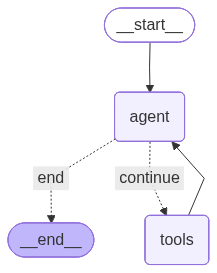
注意:有时 Mermaid 在线上无法工作
添加 blockquote
如果出现这种情况,你可以:print(hier.get_graph().draw_ascii())
或者:print(hier.get_graph().draw_mermaid())
然后前往 Mermaid Live Editor 粘贴内容以绘制图。
群体(Swarms)
关于本 notebook
本 notebook 展示了如何使用 LangGraph Multi-Agent Swarm library 中的 create_swarm 构建并编译一个多 Agent 群体(swarm)。swarm 是一种简单的编排结构,允许多个 Agent 协作,默认一个 Agent 处于激活状态,其他 Agent 在需要时接管。
它展示了什么
- Agent 协作:定义一个包含两个 Agent(
research_assistant和writer_assistant)的 swarm。 - 默认激活 Agent:将
research_assistant设为开启对话的那一个。 - 编译步骤:调用
.compile()将 swarm 固化为一个可执行的 app/图,能够处理输入并在 Agent 之间路由。
工作原理
- 定义 Agent:在代码的其他地方,
research_assistant和writer_assistant各自被定义为启用 tool 的 Agent,带有各自的 prompt 或角色。 - 创建 swarm:
create_swarm()接收这些 Agent 对象并构建一个协作结构。 - 默认激活:
default_active_agent="research_assistant"确保先启动研究,只有在需要时控制权才移交给writer_assistant。 - 编译:
.compile()返回一个可运行对象(通常是 LangGraph app),它管理跨 Agent 的 state、路由和消息传递。
为什么用这个模式
- 保持角色模块化:每个 Agent 有自己的 tools 和职责。
- 提供协调:swarm 充当管理轮流执行的 supervisor。
- 易于扩展:可以添加更多 Agent(编辑、评审、校验),而无需改变编排逻辑。
扩展与适配
- 添加一个校验 Agent,在写作者定稿之前检查事实准确性。
- 如果你想先起草后研究,可以更改默认激活 Agent。
- 添加路由规则或评分函数,决定把工作交接给哪个 Agent。
- 用 checkpointer 持久化 swarm state,使多轮任务可以跨会话继续。
要求与注意事项
- 需要安装
langgraph_swarm或等价工具。 - 传给
create_swarm的 Agent 必须已经定义并绑定 tool。 - swarm 的行为取决于 Agent 是如何被 prompt 的——清晰的角色定义能改善协作。
!pip install -q \
    langchain==0.3.27 \
    langgraph==0.6.7 \
    langchain-openai==0.3.33 \
    langchain_experimental==0.3.4 \
    langchain_community==0.3.30 \
    langchain-tavily==0.2.11 \
    python-dotenv==1.1.1 \
    langchain-core \
    langgraph-swarm==0.0.14
API Key 配置
# Option 1 (preferred): create a `.env` file in your project folder with:
# OPENAI_API_KEY=your_openai_key_here
# TAVILY_API_KEY=your_tavily_key_here
#
# Option 2: set it directly in the notebook with magic:
# %env OPENAI_API_KEY=your_openai_key_here
# %env TAVILY_API_KEY=your_tavily_key_here

from dotenv import load_dotenv
import os

# Load from .env if available
load_dotenv()

OPENAI_API_KEY = os.getenv("OPENAI_API_KEY")
TAVILY_API_KEY = os.getenv("TAVILY_API_KEY")

# Fallback: ask if still missing
if not OPENAI_API_KEY:
    print("⚠️ OPENAI_API_KEY not found. You can set it with `%env` in the notebook or enter it below.")
    OPENAI_API_KEY = input("Enter your OPENAI_API_KEY: ").strip()

if not TAVILY_API_KEY:
    print("⚠️ TAVILY_API_KEY not found. You can set it with `%env` in the notebook or enter it below.")
    TAVILY_API_KEY = input("Enter your TAVILY_API_KEY: ").strip()

print("✅ API keys loaded successfully!")
导入
import os
from typing import Annotated, List
from dotenv import load_dotenv

from langchain_openai import ChatOpenAI
from langchain_core.tools import tool

from langchain_community.document_loaders import WebBaseLoader
from langchain_tavily import TavilySearch

from langgraph.prebuilt import create_react_agent
from langgraph_swarm import create_swarm, create_handoff_tool
工具
# Tavily web search
tavily_tool = TavilySearch(max_results=5).as_tool()
@tool
def scrape_webpages(urls: List[str]) -> str:
"""Use requests and bs4 to scrape the provided web pages for detailed information."""
loader = WebBaseLoader(urls)
docs = loader.load()
return "\n\n".join(
[
f'\n{doc.page_content}\n '
for doc in docs
]
)交接工具
to_writer = create_handoff_tool(
    agent_name="writer_assistant",
    description="Transfer to the writing assistant to synthesize sources into an answer.",
)
to_research = create_handoff_tool(
    agent_name="research_assistant",
    description="Return to the research assistant to fetch or scrape more sources.",
)
LLM 配置
# Uses OpenAI through LangChain. Set OPENAI_API_KEY in your environment.
llm = ChatOpenAI(model="gpt-4o-mini", temperature=0)
Agents
research_assistant = create_react_agent(
    model=llm,
    tools=[tavily_tool, scrape_webpages, to_writer],
    prompt=(
        "You are a research assistant. Search the web with Tavily. "
        "When you have 3 to 5 solid sources, scrape key pages for details, "
        "then hand off to the writer assistant."
    ),
    name="research_assistant",
)

writer_assistant = create_react_agent(
    model=llm,
    tools=[to_research],
    prompt=(
        "You are a writing assistant. Read the provided Documents and messages. "
        "Synthesize a concise answer with citations by site name in brackets. "
        "If sources are thin or unclear, hand back to research with a short request."
    ),
    name="writer_assistant",
)
群体(Swarm)
swarm = create_swarm(
    agents=[research_assistant, writer_assistant],
    default_active_agent="research_assistant",
).compile()
运行
user_request = {
    "messages": [
        {
            "role": "user",
            "content": (
                "Find the current Swiss fintech licensing options for small startups. "
                "Gather authoritative sources and produce a short summary with three bullet points and references."
            ),
        }
    ]
}

for chunk in swarm.stream(user_request):
    print(chunk)
    print()
WARNING:langchain_community.utils.user_agent:USER_AGENT environment variable not set, consider setting it to identify your requests.
/tmp/ipython-input-338926207.py:18: LangChainBetaWarning: This API is in beta and may change in the future.
tavily_tool = TavilySearch(max_results=5).as_tool(){'research_assistant': {'messages': [HumanMessage(content='Find the current Swiss fintech licensing options for small startups. Gather authoritative sources and produce a short summary with three bullet points and references.', additional_kwargs={}, response_metadata={}, id='92bc972f-39c4-40a1-9c1d-c08aafc59ce9'), AIMessage(content='', additional_kwargs={'tool_calls': [{'id': 'call_P7xJzxBNz9GBKxqRP13Tml9z', 'function': {'arguments': '{"query":"Swiss fintech licensing options for startups 2024","search_depth":"advanced"}', 'name': 'tavily_search'}, 'type': 'function'}], 'refusal': None}, response_metadata={'token_usage': {'completion_tokens': 29, 'prompt_tokens': 2970, 'total_tokens': 2999, 'completion_tokens_details': {'accepted_prediction_tokens': 0, 'audio_tokens': 0, 'reasoning_tokens': 0, 'rejected_prediction_tokens': 0}, 'prompt_tokens_details': {'audio_tokens': 0, 'cached_tokens': 0}}, 'model_name': 'gpt-4o-mini-2024-07-18', 'system_fingerprint': 'fp_560af6e559', 'id': 'chatcmpl-C9BTjVr1UacEkd80B4FhPLaBUBqal', 'service_tier': 'default', 'finish_reason': 'tool_calls', 'logprobs': None}, name='research_assistant', id='run--5cfffd54-1060-4b58-873c-fc75d1cf8ad7-0', tool_calls=[{'name': 'tavily_search', 'args': {'query': 'Swiss fintech licensing options for startups 2024', 'search_depth': 'advanced'}, 'id': 'call_P7xJzxBNz9GBKxqRP13Tml9z', 'type': 'tool_call'}], usage_metadata={'input_tokens': 2970, 'output_tokens': 29, 'total_tokens': 2999, 'input_token_details': {'audio': 0, 'cache_read': 0}, 'output_token_details': {'audio': 0, 'reasoning': 0}}), ToolMessage(content='{"query": "Swiss fintech licensing options for startups 2024", "follow_up_questions": null, "answer": null, "images": [], "results": [{"url": "https://www.globallegalinsights.com/practice-areas/fintech-laws-and-regulations/switzerland/", "title": "Fintech Laws & Regulations 2024 | Switzerland - Global Legal Insights", "content": "The Federal Council has actively worked to remove market entry barriers for fintech companies. This approach has been underscored by the introduction of a new category of fintech licences in the Swiss Banking Act and its ordinance. By simplifying the requirements for a special licence for fintech companies, market entry barriers are lowered. Previously, such activities would have required a full banking licence, a deal-breaker for most fintech companies as they generally remain outside core [...] Switzerland has seen the emergence of several incubators and accelerators focused on fostering InsurTech innovation. According to the IFZ InsurTech Report 2023/2024, Switzerland continues to have a vibrant scene for insurtechs with 66 companies. Recognising the potential of InsurTech, traditional insurance companies in Switzerland are collaborating with startups to improve the customer experience, increase operational efficiency, and explore new business models. [...] create a growth environment for fintech companies, the Swiss legislator first created a sandbox regime and then additionally introduced a fintech licence, which was later extended to cryptocurrencies also. These allow fintech companies to accept deposits from the public without the need for a banking licence. Fintech start-ups can experiment in the market within the sandbox and then grow further with the fintech licence or even a banking licence. Furthermore, the provision of asset and/or fund", "score": 0.87113565, "raw_content": null}, {"url": "https://fintechnews.ch/fintech/fintech-in-switzerland-2024-in-review/73687/", "title": "Fintech in Switzerland: 2024 in Review - FintechNewsCH", "content": "2024 saw fintech funding drop significantly. In H1 2024, investments in fintech startups in Switzerland fell by 58.5% year-on-year (YoY), plummeting from CHF 191 million in H1 2023 to CHF 79.2 million in H2 2024, according to the new Swiss Venture Capital report. The number of financing rounds also saw a significant drop, declining from 30 in H1 2023 to just 13 in H1 2024, marking # Plot graphfrom IPython.display import Image, display
display(Image(swarm.get_graph().draw_mermaid_png()))